AI Automation Pricing UK: Costs, ROI and Budget Guide
Posted On: August 5, 2026
Last updated: August 2026
AI automation is no longer just for enterprise budgets. But what does it actually cost a small business in the UK, and is it worth it? This guide breaks down real pricing, what drives the numbers, and how to know if the ROI stacks up before you spend a penny.
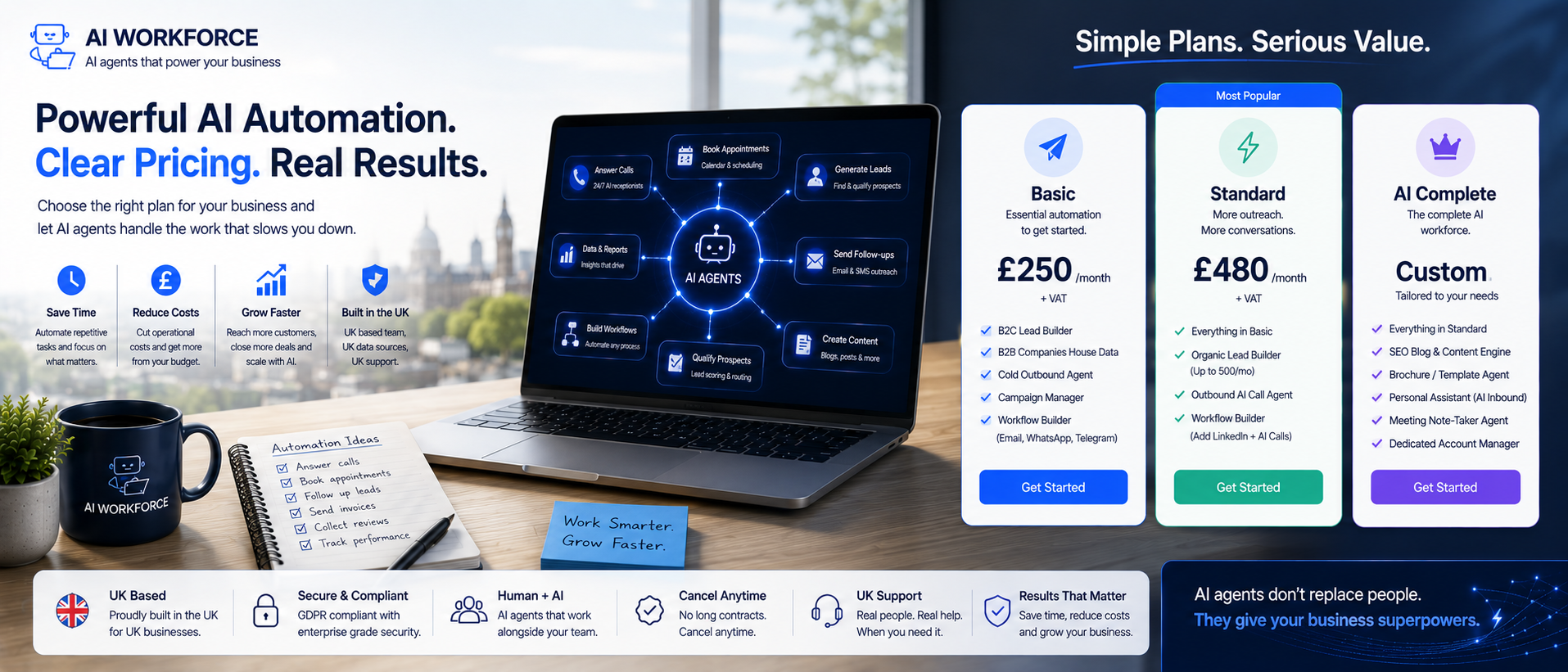
Quick Answer: AI automation for a UK small business can start at around £500 for a simple workflow. More complex multi-step builds typically cost £3,000–£10,000, while bespoke AI projects can exceed £10,000. Ongoing support adds further monthly costs depending on integrations, usage and complexity.
At a Glance
Simple workflow: £500–£2,000
Mid-range build: £3,000–£10,000
Custom AI: £10,000+
Monthly support: £200–£800
DIY platforms (Zapier, Make, n8n): £20–£50 a month
What Are You Actually Paying For?
Before you can evaluate any quote from automation agencies, you need to understand what the cost is actually made up of. AI automation pricing covers several layers: the software platforms or API connections used to build the system, the time spent designing and configuring the workflow, and any integration work needed to connect your existing tools- your CRM, your inbox, your booking system- to the new automation.
A properly scoped automation project should also account for testing and any ongoing support required after launch. The build cost and the cost of keeping the workflow operating are separate parts of the budget and should both be understood before work begins.
AI Workforce Insight
AI Workforce's preferred starting point is one well-defined workflow with a measurable baseline. This makes implementation cost, operating performance and realised value easier to evaluate before expanding into additional processes.
The AI Workforce Automation Cost Model
We assess an automation budget across seven areas:
Scope → Systems → Data → Build → Usage → Support → Change
Scope: how much of the process is being automated
Systems: how many tools and integrations are involved
Data: how much cleaning, preparation or permissioning is required
Build: configuration, workflow design, testing and implementation
Usage: API calls, messages, records, minutes or other variable charges
Support: monitoring, maintenance and human oversight after launch
Change: future workflow updates and integration changes
A quote that prices the build but ignores usage, support and future change does not represent the complete cost of the automation.
Signs You're Ready to Invest
A few practical signals suggest a process is ready to be automated. If two or three of these sound familiar, that's usually a reasonable place to start:
Staff spend hours a week on repetitive admin
The same work is duplicated across more than one system
Enquiry volumes are high and similar in nature
Follow-ups regularly get missed
CRM records are incomplete or out of date
Existing software isn't connected to the rest of your stack
Understanding AI Automation Pricing Models
Common pricing structures include fixed project fees, monthly retainers and usage-based charges. Some providers also use outcome-based or hybrid models. A fixed project fee means you pay a set amount for a defined scope of work. This works well for contained builds like a single workflow automation or a standalone AI chatbot. The scope is clear, the price is clear, and the risk sits with the agency.
A retainer-based model means you pay a monthly fee for a set number of hours, ongoing development, and support. This suits businesses that want to keep iterating: adding new automations, adjusting existing ones, and getting regular input from an expert. Usage-based pricing is often tied to API calls, the number of records processed, or messages handled. This model scales with your volume, which makes it appealing but can create unpredictable costs if usage spikes. Outcome-based pricing, where a provider charges only when a task is completed successfully, and hybrid structures combining several of these approaches are increasingly common as well.
Most pricing for AI automation in the UK blends elements of several of these. You might pay a fixed fee for the build and a monthly retainer for support, with usage costs passed through at cost. Always ask for a breakdown. Understanding AI automation pricing fully means knowing which numbers are fixed and which can grow.
What Does Automation Cost in the UK in 2026?
Automation costs in the UK vary significantly depending on what you are building.
Project type | Typical cost | What it covers |
|---|---|---|
Simple workflow | £500–£2,000 | A contact form routed into your CRM with a follow-up email, typically on a no-code platform |
Mid-range build | £3,000–£10,000 | A multi-step lead qualification process, invoice processing, or an AI agent that handles customer queries and escalates edge cases |
Custom AI | £10,000+ | A bespoke AI application or agent built around specific business workflows, data, integrations and controls, potentially including multi-system or voice deployments |
Monthly support | £200–£800 | Ongoing maintenance, typically scaled to usage and complexity |
AI Workforce illustrative planning ranges, August 2026. These are internal scoping assumptions based on project complexity, not independently verified UK market averages or quotations. Actual pricing varies by provider, integrations, usage, support and governance requirements.
Costs in the UK range this widely because the complexity of integration varies enormously. Connecting to a standard CRM via a documented API is fast. Connecting to a legacy system with no API takes much longer.
Voice automation has its own cost structure on top of general implementation pricing, including speech-to-text, language-model usage, text-to-speech, telephony, phone numbers and concurrency. For a dedicated breakdown, see our guide to AI voice agent pricing in the UK.
What Makes an AI Automation Project More Expensive?
A handful of factors reliably push the price of a project up: the number of software integrations required, legacy systems with no documented API, poor-quality CRM data that needs cleaning before anything can be built on top of it, multiple approval stages built into the workflow, bespoke application logic, integrations and evaluation requirements rather than standard off-the-shelf configuration, voice AI (which tends to require more testing than text-based automation), complex security requirements, high usage volumes, and industry-specific compliance requirements. Knowing which of these apply to your project before requesting a quote makes it much easier to sanity-check what comes back.
AI Chatbots: What Do They Cost?
A chatbot can be a relatively contained first automation project where the main requirement is answering FAQs and routing enquiries. A basic rule-based chatbot that answers FAQs and routes queries can be set up for as little as £500 to £1,500. An AI chatbot, one that uses a language model to understand and respond to open-ended questions, typically starts at £2,000 to £5,000 for a properly configured build, depending on how many systems it needs to connect to.
AI chatbots that integrate with your CRM can look up order history, book appointments, and hand off to a human when needed; they cost more, usually £4,000 to £8,000. The cost also depends on the platform: some AI tools charge a flat monthly fee, others charge per conversation or per message, which means the more your chatbot is used, the more you pay. Both models work, but you need to model your expected volume before choosing.
For UK SMEs that handle high volumes of repetitive enquiries, bookings, stock questions, and support tickets, an AI chatbot can produce a positive return where the value of staff time saved and improved handling exceeds its build and ongoing operating costs. For a closer look at pricing and setup in a phone-heavy environment specifically, see our guide to AI call centre agents.
When Simple Automation Is Enough
Not everything needs AI. Plenty of genuinely useful automation is achievable with basic, rule-based tools at a fraction of the cost: email notifications, calendar reminders, moving files between systems, routing form submissions, and simple CRM field updates. These are predictable, single-step tasks with no judgement involved. Spending on an AI-powered solution for a task that a basic automation already handles well is one of the more common ways businesses overspend on their first project.
Hidden Costs to Watch
A build quote may not include every ongoing cost. Depending on the deployment, additional costs can include API usage that scales with volume, maintenance when an upstream tool changes its API, staff training time, periodic model upgrades, security reviews for customer data, and the internal project management time it takes to keep a build on track. For that reason, the first-year total cost can be materially higher than the initial build fee alone, and contract length matters: a 12-month platform lock-in on a tool that underdelivers is a cost that compounds.
How Long Does It Take?
Project type | Typical timeline |
|---|---|
Simple workflow | One to two weeks |
Multi-step workflow | Two to six weeks |
Custom AI agent | Six weeks or more |
Illustrative ranges; actual timelines depend heavily on how ready your data and systems are before the build starts.
How to Calculate AI Automation ROI
AI automation ROI is not complicated to calculate, but most business owners skip it. Start by establishing the current baseline: how many staff hours the workflow consumes, the fully loaded cost of that time, current error or rework costs, and any measurable commercial value affected by the process. Then measure what genuinely changes after automation. Hours released represent capacity value, not automatically cash savings, so ROI should be based on realised financial benefit against the complete cost of implementing and operating the automation.
Released capacity value = hours genuinely released × fully loaded hourly cost
Realised financial benefit = avoidable cash cost + additional contribution generated from redeployed capacity + measurable error costs avoided
ROI = (realised annual benefit − complete annual automation cost) ÷ complete annual automation cost × 100
Released capacity is not automatically a cash saving. Hours freed up by an automation only become a realised financial benefit if they remove a genuine cost, such as no longer needing agency or overtime cover, or if that time is redeployed into work that generates measurable additional value. For illustration, assume a UK SME spends 5 to 10 hours per week on manual invoice entry, checking and chasing, at a fully loaded cost of £20 to £30 per hour, worth £400 to £1,200 per month in released capacity. Whether an automation costing £300 a month for that task produces a realised benefit depends on what actually happens to those released hours, not on the released capacity figure alone. For a closer look at where AI fits into invoice and bookkeeping workflows, see how AI helps accountants work faster.
The less obvious return from AI comes from speed and accuracy. ROI is more reliable when cost is measured alongside quality, reliability and risk rather than in isolation. Our guide to AI agent KPIs explains how to track cost per successful outcome, correction rates, reliability metrics, guardrails and business impact together. Automation can apply a defined process consistently and operate outside normal working hours, but it can still produce incorrect outputs when source data, extraction, integrations or workflow rules fail. Error rates should therefore be measured against the existing manual process rather than assumed to disappear. Where a properly configured automation does reduce errors in invoicing, CRM records or customer communications, that value is real even when it is harder to quantify. Factor it in as a conservative estimate based on measured error rates, not an assumption that automation is error-free.
Should UK SMEs Work with an Agency or Go DIY?
Businesses considering automation often need to decide whether to configure a workflow internally or use a specialist. DIY using platforms like Zapier, Make, or n8n can bring the cost of a simple workflow automation down to just the platform subscription, sometimes as little as £20 to £50 per month. If you have someone in-house who is comfortable with these tools, starting there is sensible. The automation will not be as sophisticated, but the learning and cost control are valuable.
Working with a specialist can reduce the amount of internal learning and implementation work required, particularly where the workflow involves custom integrations, security requirements or several connected systems. The trade-off is a higher upfront service cost and greater dependency on the provider, so experience with the specific workflow and integrations should be verified rather than assumed.
What Can a Small Business Realistically Automate?
Processes worth assessing first are often high-volume, repeatable and currently manual. Examples include lead intake from website forms, invoice processing, appointment reminders, customer onboarding sequences, CRM data entry, and support ticket routing. Each of these has a defined input and a defined output, which is exactly what AI automation handles best.
If you're deciding which process to tackle first, our Small Business Automation Ideas guide covers 15 practical workflows and includes an Automation Priority Test for comparing tasks by frequency, repetition, time cost, error tolerance, exception rate and data readiness.
An AI agent can go further. Rather than just moving data from one place to another, it can read a customer email, understand what they are asking, check their order history in your CRM, draft a response, and send it, all without a human involved.
Before investing in a custom build, audit the AI and automation capabilities already included in software you pay for, such as your email platform, your CRM or your accounting software. In some cases, an existing feature may solve the problem without additional implementation cost.
How to Budget for Your First Automation Project
To budget accurately and avoid surprises, start with a realistic scope. Pick one process, not your entire operation, and map it out end to end. What triggers it? What data does it need? What systems does it touch? What does a successful outcome look like? That exercise will reveal the complexity and help any agency quote accurately. Vague briefs lead to vague quotes and unexpected costs later.
Include a contingency allowance appropriate to the uncertainty in the project rather than assuming the quoted build price is the maximum cost. The appropriate buffer depends on integration complexity, data quality, scope certainty and how much discovery has already been completed. Ask the provider to identify which assumptions could materially change the quotation.
For cost control over the long term, push for clear pricing on running costs before you sign anything. What does the monthly fee cover? What triggers an additional charge? What happens when you need to change the workflow six months from now? These are the questions that protect your budget, and any reputable provider should be able to answer them clearly before you commit.
Questions to Ask Before Accepting a Quote
A short list of questions, asked before you sign anything, tends to prevent most of the budget surprises later: What's included in the monthly fee, specifically? Who owns the workflow once it's built? What happens if a connected system changes its API? What level of support is included, and for how long? Are API usage costs included in the quote or billed separately? What assumptions were made about our data and systems when this quote was put together? And how are future changes to the workflow priced? A provider who can answer these clearly and specifically is a good sign.
Common Mistakes to Avoid
Common mistakes to avoid: automating a process that's broken to begin with, choosing software before the workflow has been properly defined, ignoring ongoing API costs when comparing quotes, underestimating the staff time needed for training and adoption, skipping proper testing to save time, and trying to automate an entire department at once instead of one process.
Is AI Adoption Worth It for UK Small Businesses?
AI adoption for a small business is worth it when the maths works and the process is ready. The maths works when the time or error cost of doing something manually exceeds the cost of automating it, which is true for more processes than most business owners assume. The process is ready when it is defined, consistent, and not changing every week. Automate what is stable first.
AI and workflow automation are becoming increasingly accessible to UK SMEs. The commercial case still depends on the individual process: businesses should prioritise automations where the time, service or error-cost benefit can be measured rather than adopting AI simply because competitors are doing so.
A disciplined approach is to choose one well-defined process, establish a baseline, measure the outcome and expand only once the value is demonstrated. Implementation discipline can matter more than simply increasing the initial budget.
Ready to plan your first automation project?
Get a clear breakdown of build cost, running cost and expected return before you commit to anything.
Frequently Asked Questions
How much does AI automation cost for a small business in the UK?
Simple workflows typically start from around £500, mid-range builds fall between £3,000 and £10,000, and custom AI projects start from £10,000 upwards. Monthly support usually runs £200 to £800, depending on complexity and usage.
Is there a cheaper way to get started?
Yes. DIY platforms like Zapier, Make or n8n can bring the cost of a simple workflow down to a monthly subscription, often £20 to £50, if you have someone in-house comfortable configuring it.
How quickly does AI automation pay for itself?
There is no reliable universal payback period. Establish the current cost and performance of the workflow first, then compare verified benefits against the complete implementation and operating cost. Higher-volume, stable workflows may reach payback sooner, but the result should be calculated from the business's own data rather than an industry assumption.
What hidden costs should a business budget for?
Commonly overlooked costs can include API usage, maintenance, integration changes, staff training, monitoring and internal project time. The build cost is only one part of the total cost over the first year.
Should I build this myself or hire an agency?
Simple, contained workflows can be reasonable to build internally where the business has suitable technical capability. A specialist may be useful where the workflow involves complex integrations, security requirements or several connected systems, but experience with the specific workflow and integrations should be verified before choosing a provider.
How do I know if a process is worth automating?
If it's high-volume, repetitive, rule-based, and currently done manually, it's usually a strong candidate. Processes that change constantly or require significant judgement are harder to automate well.
Do I need AI, or would simple automation do the job?
Not always. Straightforward tasks like notifications, reminders and file routing are often better solved with basic automation rather than an AI-powered tool, at a fraction of the cost.
What should I ask before signing a contract?
At minimum: what the monthly fee covers, who owns the workflow, how API costs are billed, what support is included, and how future changes are priced.
Key Takeaways
Simple automation workflows in the UK start from around £500. Mid-range AI builds typically cost £3,000–£10,000
Always price the total cost, build fee plus monthly running costs, before committing
API usage, maintenance, integration changes, staff time and monitoring should all be included when estimating total cost
Released staff capacity is not automatically a cash saving. Calculate ROI from realised financial benefit against the complete implementation and operating cost, using the business's own baseline
An AI chatbot can produce a positive return where the value of staff time saved and improved handling exceeds its build and ongoing operating costs
DIY tools can suit contained workflows where suitable internal capability exists; more complex integrations may justify specialist implementation support
Start with one stable, rule-based process, not a company-wide transformation
Include a contingency allowance appropriate to integration complexity, data quality and scope uncertainty rather than assuming one fixed percentage applies to every project
Investment should be based on measurable business value and workflow readiness rather than adopting AI for its own sake
Sources and Methodology
AI Workforce planning bands (simple workflow, mid-range build, custom AI, monthly support): first-party AI Workforce planning assumptions based on typical project scope, not independently verified UK market averages or quotations
Zapier, Make and n8n platform subscription prices: vendor-published pricing, checked August 2026
Worked ROI and invoice-processing calculations: illustrative examples for demonstrating a calculation method, not measured outcomes from a specific business
About AI Workforce
AI Workforce helps UK organisations introduce AI safely through practical automation, AI agents and workflow design. We work with businesses to identify suitable use cases, improve productivity and implement AI with appropriate governance and human oversight.
Reviewed: August 2026