AI Agent vs Chatbot: Differences, Costs and Business Use Cases
Posted On: August 6, 2026
Last updated: August 2026 · Written by Seth Ayush, Co-Founder of AI Workforce
A chatbot answers questions. An AI agent completes tasks. That distinction sounds simple, but it shapes everything from cost to risk to how much oversight a system actually needs. This guide sets out the real difference, what each one costs in the UK, where each fits best, and how to choose the right starting point for your business.
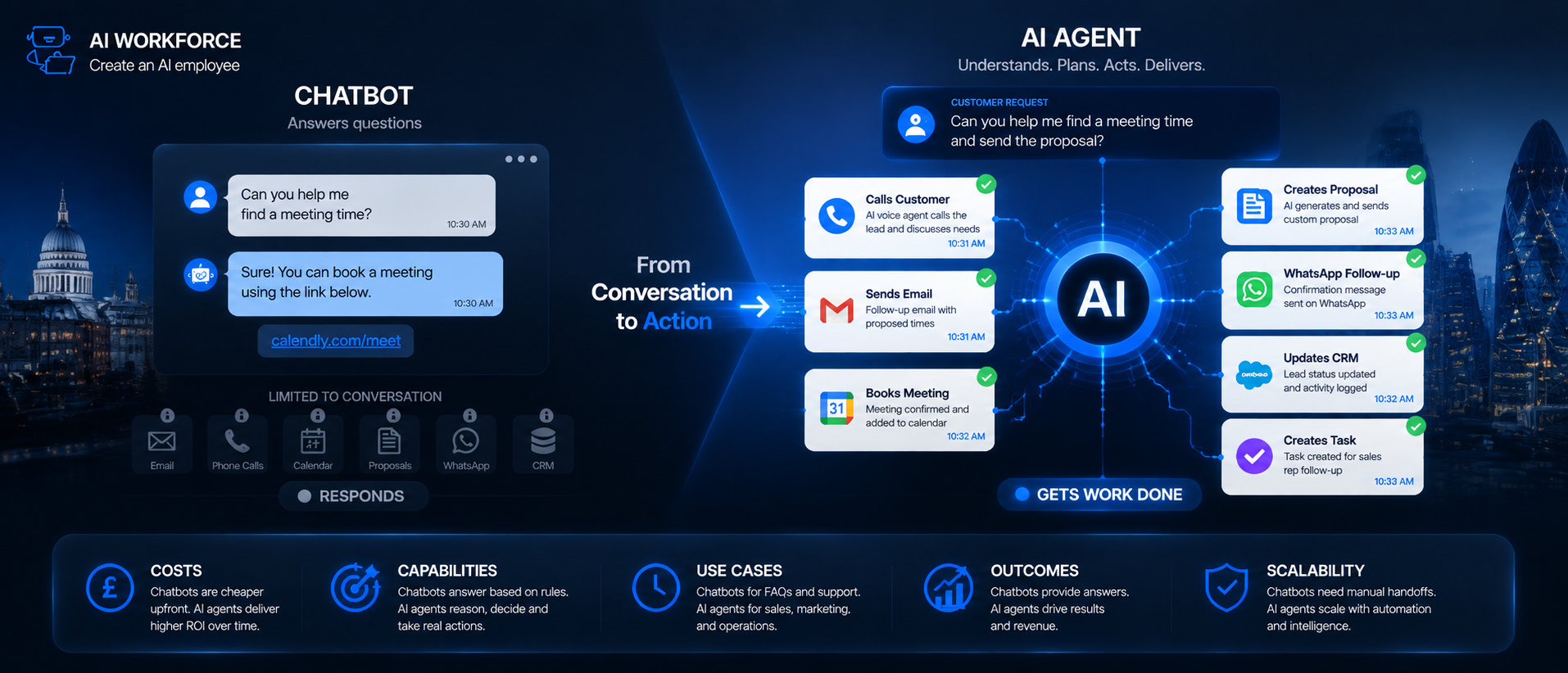
Quick Answer: A chatbot answers questions using a script or a language model, staying inside a conversation. An AI agent goes further: it can look things up, make decisions and take action across your business systems, such as updating a CRM record, booking an appointment or sending a follow-up, without a person carrying out each step. Most businesses do not need to choose one permanently. Many start with a chatbot for straightforward enquiries and expand into agent capability once a specific, well-defined task is ready to be automated.
At a Glance
What a chatbot does: answers questions and holds a conversation, usually within a single channel
What an AI agent does: completes multi-step tasks by using tools, data and integrations, often finishing something rather than just discussing it
Typical cost: basic chatbots from around £500 to £1,500; AI agent builds commonly £3,000 to £10,000, with custom projects £10,000 and up
Best starting point: a chatbot for FAQs and routing, an AI agent for a task with a clear trigger and a clear outcome
Main risk: giving an agent more access or autonomy than the business is ready to monitor
What's Covered
What Is a Chatbot?
What Is an AI Agent?
The Key Difference: Answering vs Acting
What Each Handles Well
What Each Costs
Business Examples
Limitations and Risks
Governance and Data Considerations
Choosing the Right Tool for Your Business
Measuring Whether It's Working
FAQs
Key Takeaways
What Is a Chatbot?
A chatbot is software built to hold a conversation. The simplest versions are rule-based: they match what a customer types against a set of predefined questions and return a scripted answer. More capable chatbots use a language model to understand open-ended questions and respond naturally, rather than requiring an exact match to a pre-written phrase.
What a chatbot generally does not do, even a sophisticated one, is take independent action outside the conversation. A well-built chatbot can look up an order status or answer a policy question. Whether it can also change something, cancel an order, update a record, book a slot, depends on whether it has been connected to the systems needed to do that. Many chatbots are deliberately kept read-only, answering from existing information rather than writing back to a database.
What Is an AI Agent?
An AI agent is built to complete a task, not just answer a question. It can be connected to approved tools such as a CRM, a calendar, an email inbox or an internal database, and instructed to use them to reach an outcome. A customer email asking to reschedule an appointment might be read by an agent, checked against calendar availability, updated in the booking system and confirmed back to the customer, with no person touching any of those steps.
This is the same underlying category covered in our guide to AI agents for small businesses, which looks at where this kind of system tends to add the most value.
That does not mean an agent should be left unsupervised from day one. The agents that work reliably in practice are the ones given a narrow, well-defined scope, with clear rules about what they can do without approval and when a case should be handed to a person. An agent with too broad a remit is harder to test and harder to trust, regardless of how capable the underlying model is.
The Key Difference: Answering vs Acting
The distinction that matters most is not how advanced the underlying AI model is. It is whether the system is confined to conversation or connected to action. A chatbot running on a highly capable language model is still a chatbot if it cannot do anything beyond respond. An AI agent does not need the most advanced model available to be useful. If it can reliably complete a defined task from start to finish, it is already providing agent capability.
In practice, the line blurs. A chatbot that can check order status by querying a database is already taking a small action. An agent that mostly answers questions and only occasionally updates a record sits close to the chatbot end of the spectrum. Rather than treating this as two fixed categories, it is more useful to think of it as a spectrum of how much a system is allowed to do on its own, and how many systems it touches to do it.
AI Workforce Insight: in our experience, the hardest part of building an AI agent is rarely the model itself. It is deciding, precisely, what the agent is allowed to do without asking first, and building a reliable way for it to recognise when a case falls outside that boundary. Teams that get this right usually spend more time defining the rules than configuring the tools.
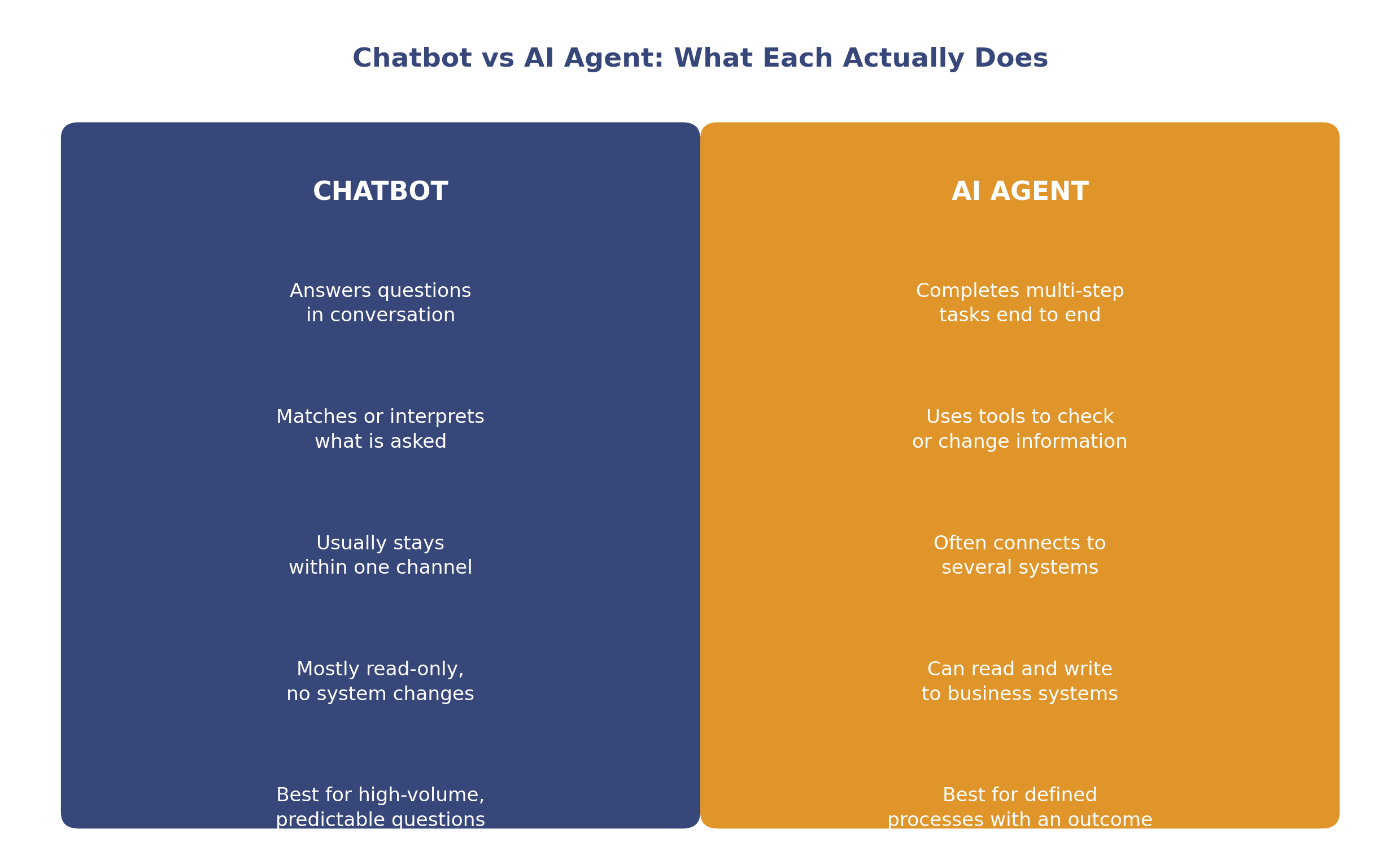
Illustrative comparison. Many real systems sit somewhere between the two, depending on what they are connected to.
What Each Handles Well
Chatbots tend to work well for:
Answering frequently asked questions consistently, at any time of day
Routing an enquiry to the right team or resource
Providing information that already exists, such as opening hours, pricing or policy details
A first line of contact where most questions are predictable and repeat often
AI agents tend to work well for:
Multi-step tasks with a clear trigger and a clear outcome, such as lead intake and CRM updates
Work that involves checking or changing information across more than one system
High-volume, structured processes such as scheduling, follow-up sequencing or invoice handling
Tasks where speed and consistency matter more than nuanced judgement
Both approaches struggle with genuinely ambiguous requests, sensitive conversations and situations that fall outside their defined scope. That is not a flaw specific to either category. It is a reason to build an escalation path to a person into any deployment, regardless of which one you choose.
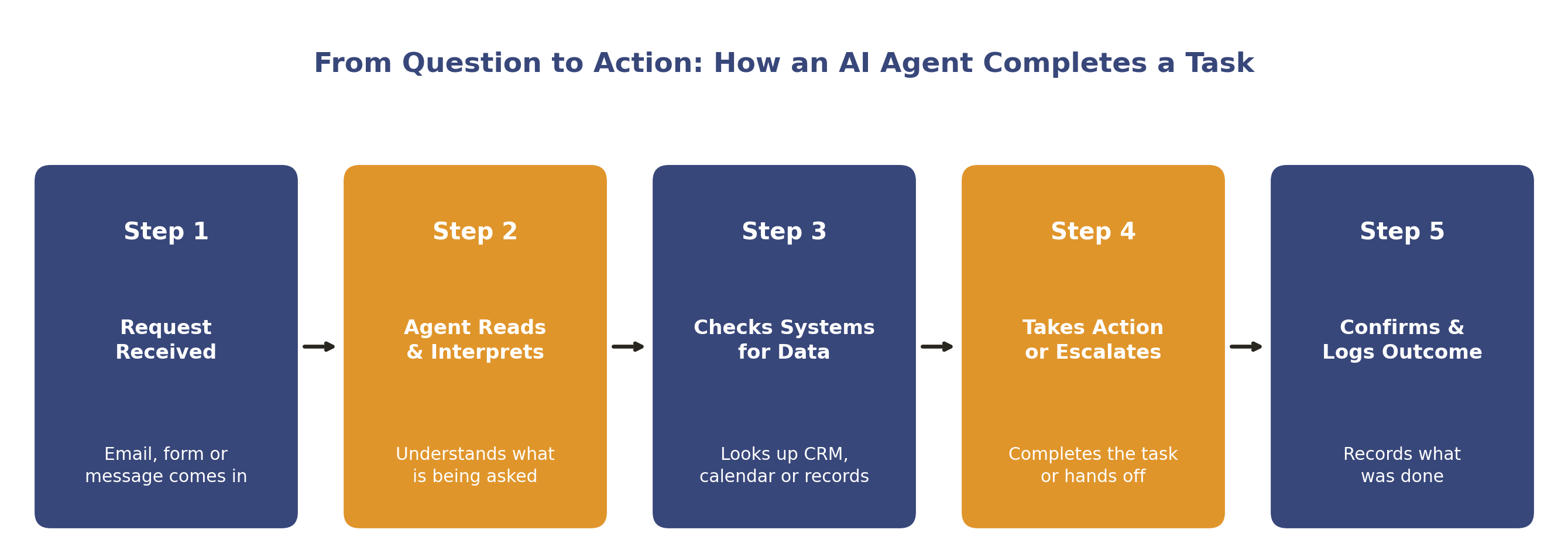
Illustrative workflow. A production system also needs monitoring, logging and a tested escalation path around these steps.
What Each Costs
Cost depends far more on scope and integration complexity than on the chatbot-versus-agent label. Based on typical UK small business projects:
Basic rule-based chatbot: around £500 to £1,500 to set up, answering FAQs and routing enquiries
AI chatbot using a language model: typically £2,000 to £5,000, depending on how many systems it needs to connect to
CRM-integrated chatbot: usually £4,000 to £8,000, since it needs to read and sometimes write to existing business systems
Mid-range AI agent build: commonly £3,000 to £10,000 for custom workflow implementations, such as a multi-step lead qualification process or an agent that handles queries and escalates edge cases
Custom AI agent: £10,000 and up for a bespoke build, a trained model for a specific use case, or an agent connected to several core systems
Ongoing monthly cost: typically £200 to £800 for maintenance, support and usage, scaling with complexity
These figures reflect custom development projects rather than off-the-shelf software. Subscription-based AI agent products from software vendors are often priced differently, on a monthly or usage basis, so it is worth checking which pricing model a quote is actually based on.
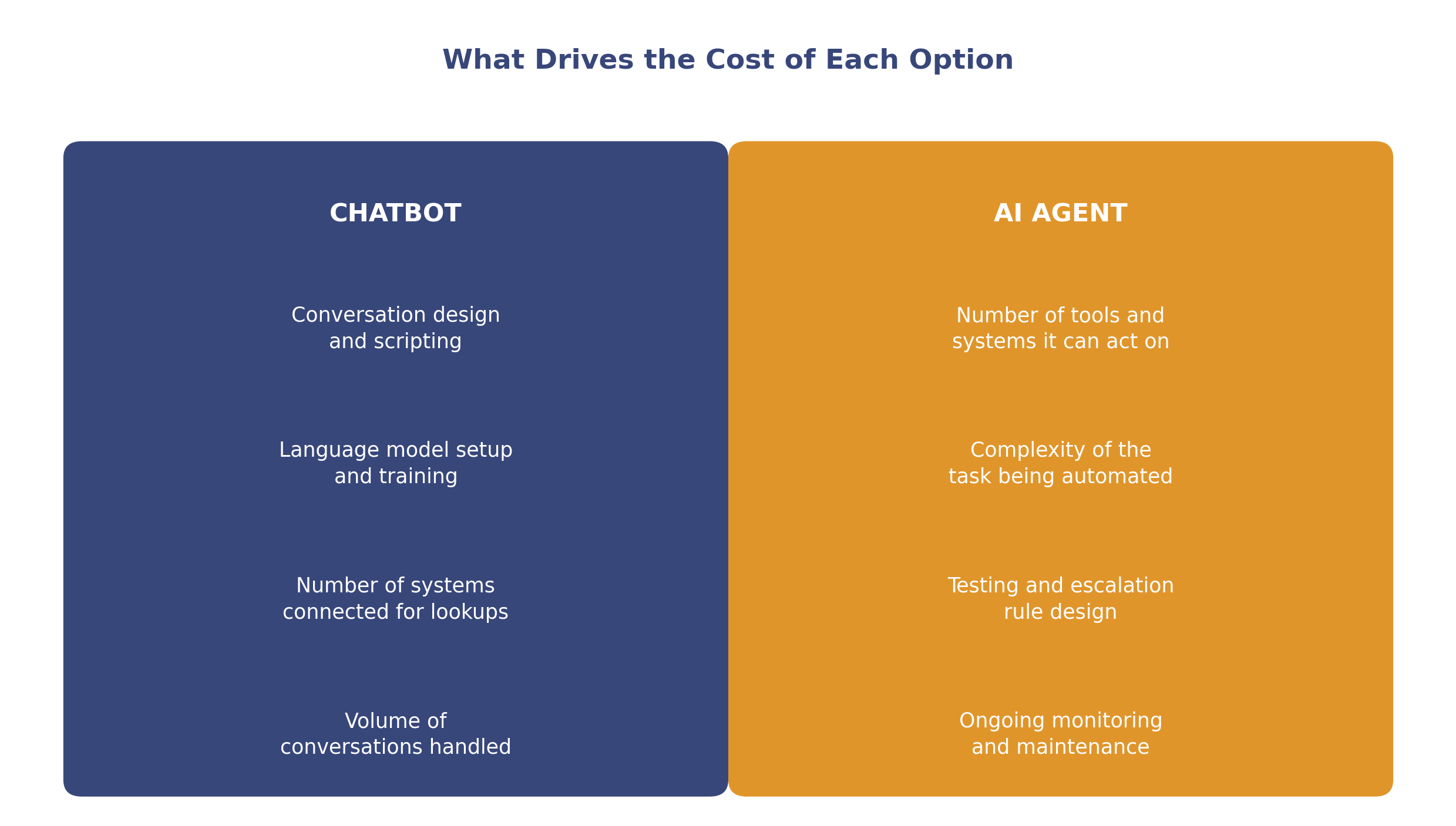
Illustrative cost drivers. Actual pricing depends on scope, data quality and how many systems are involved.
These figures reflect general UK market ranges rather than a fixed price for any specific project. A more detailed breakdown of what drives automation pricing, and how to budget for a first project, is covered in our guide to AI automation pricing.
Business Examples
A trades business uses a chatbot on its website to answer pricing and availability questions, then hands off to a person for anything more specific
A recruitment agency uses an AI agent to screen inbound CVs against role criteria, shortlist candidates and schedule first-round interviews automatically
A clinic uses a chatbot to answer common questions about appointments and opening hours, while a separate AI agent handles the actual rebooking once a patient confirms a change
An accountancy practice uses an AI agent to process incoming invoices, match them against purchase orders and flag anything that does not reconcile for a person to review
A retailer uses a chatbot for order-status enquiries and an AI agent behind the scenes to manage stock-level alerts and reorder suggestions
A professional services firm uses an AI receptionist agent to answer inbound calls, qualify enquiries, book meetings, update CRM records and send summaries to the team, allowing staff to focus on higher-value conversations
Limitations and Risks
Neither a chatbot nor an AI agent is infallible, and the risks differ depending on how much autonomy the system has. A chatbot that gives an inaccurate answer creates a bad customer experience. An AI agent that takes the wrong action, updating the wrong record, sending an incorrect confirmation, can create a more consequential problem, simply because it has done something rather than just said something.
Common failure points include out-of-date or poor-quality source data, edge cases that were not anticipated during testing, and giving a system broader access than the task actually requires. An agent connected to more tools than it needs is harder to monitor and creates a larger blast radius if something goes wrong. The safest deployments tend to start narrow, with a small number of permissions, and expand only once performance has been observed over time.
Neither tool should be presented to customers as more capable, or more human, than it actually is. Being clear that a customer is interacting with an automated system, and making it easy to reach a person, is a reasonable baseline regardless of which type of system is deployed.
Governance and Data Considerations
Any system that reads or writes customer data needs the same basic data protection discipline as a human employee performing the same task, and the considerations grow as autonomy increases.
Only connect the systems and data the chatbot or agent actually needs for its defined task
Keep a record of what actions an agent is permitted to take without human approval, and review that list periodically
Apply the same UK GDPR principles to AI-handled data as to any other processing: purpose limitation, data minimisation and a clear retention approach
Log what an agent does, not just what it is told, so actions can be reviewed and errors traced back to a cause
Agree an escalation path for anything the system is not confident about, and monitor how often that path is actually used
Review vendor contracts for where data is processed and stored, particularly where a chatbot or agent handles special category or sensitive information
Choosing the Right Tool for Your Business
Start with the task, not the technology. If the goal is answering questions consistently and routing enquiries, a chatbot is very likely sufficient, and it is the simpler, lower-risk place to start. If the goal is completing a defined process end to end, updating records, scheduling, following up, an AI agent is more likely to deliver the outcome you actually want.
A useful test: describe the task in one sentence. If that sentence ends with a question being answered, a chatbot probably covers it. If it ends with something being done, a booking confirmed, a record updated, a follow-up sent, that points toward an agent. Many businesses end up running both: a chatbot for the front door, and one or more agents handling specific tasks behind the scenes.
It is rarely necessary to choose the most advanced option available. The right tool is the one that matches the complexity of the task, not the one with the most capability on paper. Our guide to AI agents for small businesses and our broader digital workforce guide both go into more detail on matching a use case to the right kind of system. Once you have settled on an agent, our guide on writing an AI agent brief covers how to scope its permissions and escalation rules before development starts.
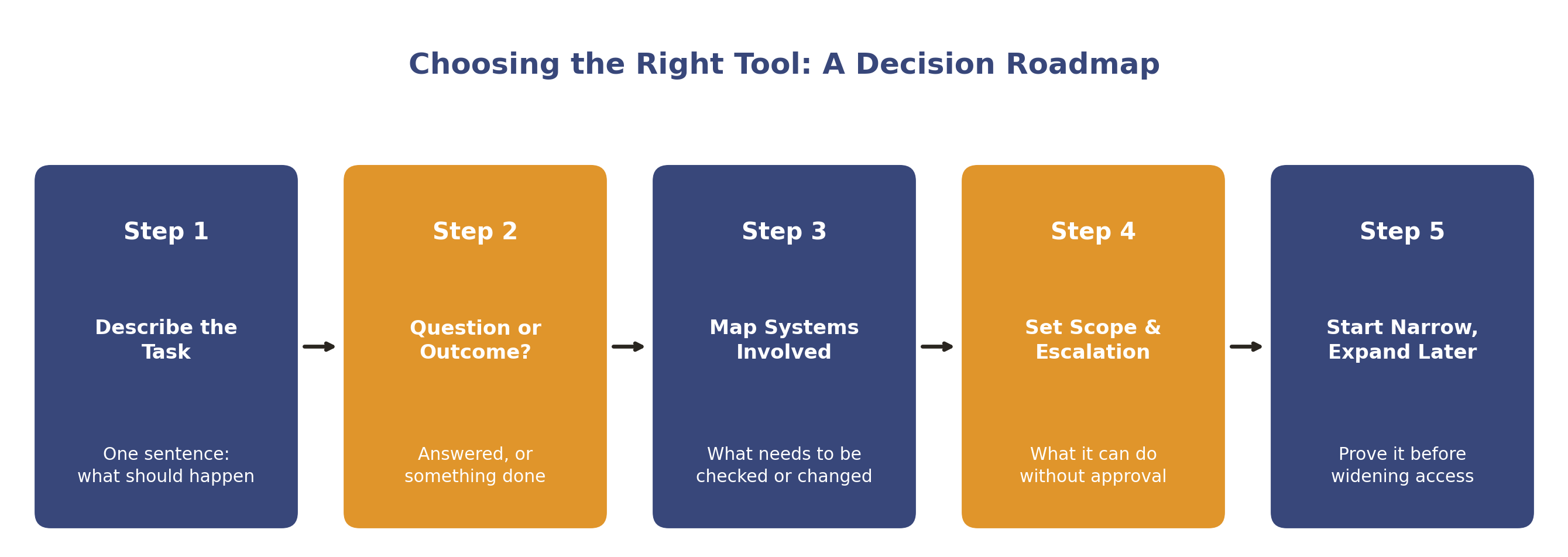
Illustrative roadmap. Pace depends on the task's complexity and how many systems it touches.
Measuring Whether It's Working
Whichever system you deploy, define what success looks like before you launch, not after. For a chatbot, useful measures include the proportion of enquiries resolved without human involvement, response accuracy and how often a conversation is escalated to a person. For an AI agent, look at task completion rate, how often the agent's output needs correction, and how much staff time the task previously required compared with now.
Review performance on a set schedule rather than only when something goes wrong. A short weekly or monthly check, comparing what the system did against what it was meant to do, is usually enough to catch drift early and decide whether the scope is ready to expand.
Frequently Asked Questions
What is the difference between a chatbot and an AI agent?
A chatbot holds a conversation and answers questions. An AI agent can take action across business systems, completing a task rather than only discussing it. Many systems sit somewhere between the two, depending on what they are connected to.
Can a chatbot become an AI agent?
In practice, yes. Once a chatbot is given access to tools, a CRM, a booking system, an email account, and permission to use them, it starts to behave like an agent. The distinction is more about capability and access than about the underlying product category.
Do I need an AI agent, or is a chatbot enough?
If the goal is answering questions and routing enquiries, a chatbot is usually enough. If the goal is completing a multi-step task with a clear outcome, an AI agent is more likely to deliver it. Many businesses use both for different parts of the same process.
How much does an AI agent cost compared to a chatbot?
Basic chatbots typically start from around £500 to £1,500. AI agent builds are commonly £3,000 to £10,000, with custom projects £10,000 and up. Cost depends more on integration complexity than on the label attached to the system.
Are AI agents safe to give access to business systems?
They can be, provided access is limited to what the task requires, actions are logged, and there is a clear escalation path for anything the agent is not confident about. Starting with narrow permissions and expanding gradually is the safer approach.
Can an AI agent make phone calls?
Yes, when connected to voice infrastructure, an AI agent can handle inbound or outbound calls in a similar way to how it handles other tasks. This is usually treated as its own deployment with additional testing, given the real-time nature of a phone conversation. Our AI voice agents guide covers this in more detail.
Do AI agents need human oversight?
Yes, particularly in the early stages of a deployment. Keeping a person in the loop while performance is observed is how trust in an agent's output is actually built, rather than assumed.
Key Takeaways
A chatbot answers questions within a conversation. An AI agent completes tasks by taking action across business systems
The distinction is a spectrum of access and autonomy, not two fixed categories
Basic chatbots start from around £500. AI agent builds commonly run £3,000 to £10,000, with custom projects higher
Chatbots suit high-volume, predictable questions. Agents suit multi-step tasks with a clear trigger and outcome
Start with narrow permissions for any agent and expand only once performance has been observed
Data protection principles apply to AI-handled data the same way they apply to any other business process
Many businesses use a chatbot and one or more agents together, rather than choosing one exclusively
Define what success looks like before launch, and review performance on a regular schedule
See If a Chatbot or AI Agent Fits Your Business
Not sure which one makes sense for your business, or whether you need both? We'll help you work out the right starting point based on your actual processes.
About the Author
Seth Ayush is Co-Founder of AI Workforce, a British AI company building AI agents for UK businesses. He works on how AI Workforce's automation and agent products are scoped, tested and deployed for small and medium-sized businesses.
Reviewed: August 2026