AI Document Automation and Document Processing Guide
Posted On: July 30, 2026
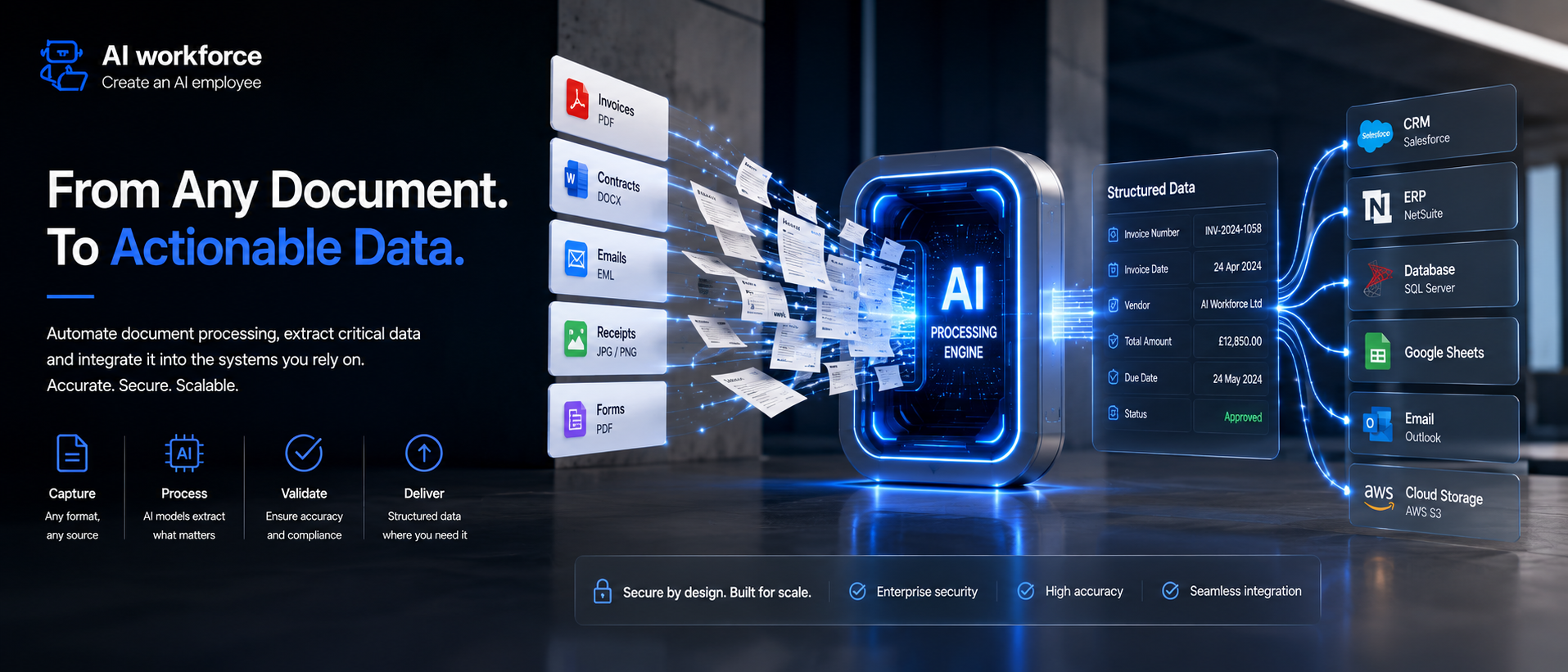
Document automation once meant expensive custom software built by a dedicated IT team. This technology changes that: modern document AI tools handle extraction, structuring, and routing automatically, and understanding how the system works helps you pick the right approach for your business. This guide shows you how to use AI document automation without needing to write a single line of code.
What Is Document Automation and How Does It Actually Work?
Document automation refers to using software to handle the repetitive parts of working with paperwork: pulling out data, applying a template, and routing the result to the right person, without a human retyping anything by hand. AI is transforming this from a rules-based system into something closer to genuine document understanding.
Older systems matched fixed templates; newer AI technologies read a document more the way a person would, recognising a field even when the layout changes. AI models trained on millions of examples handle this variation far better than the rigid template-matching of a decade ago, and generative AI adds the ability to summarise or rewrite document data once it's been extracted.
Most modern platforms expose this through an api, so the extraction and routing logic can plug directly into whatever system already runs your business, rather than living in a separate silo.
What Type of Document Can AI Document Automation Handle?
A tool's range varies a lot between platforms: some specialise in a handful of business documents, invoices, contracts, and purchase orders, while others aim to cover every format a company might receive.
Document types range from a structured form with fixed fields to a free-form PDF with no consistent layout at all, and the best tools handle both without needing a different setup for each. Document formats worth checking before you commit include scanned images, native PDF, and structured exports from other systems.
Multiple document sources processed through the same pipeline is where the real time saving shows up, rather than handling one new document type at a time by hand.
How Do You Automate Document Processing From Start to Finish?
Automate document processing in three stages: capture, extract, and route. Capture pulls the file in regardless of source, whether that's an email attachment, a scanned PDF, or a direct upload.
Automate the extraction step next: pulling structured data out of an unstructured file, checking it against expected values, and flagging anything that looks wrong before it moves further down the workflow. A good document workflow makes this visible at every stage, not just at the end.
Document processing at this stage should need almost no manual intervention: the workflow routes the output to the right system, the right folder, or the right person automatically, and work that used to take an afternoon collapses into minutes.
Where Does Document Automation Deliver the Most Value?
Document automation use cases span nearly every back-office function: invoice processing, contract review, onboarding paperwork, compliance filing. Each use case looks slightly different, but the underlying pattern- extract data, validate it, route it, stays the same.
Data extraction is the use case most businesses start with, since it has the clearest, most measurable payoff: pulling data from any document- an invoice, a form, a contract- without anyone typing it into a spreadsheet by hand. Document extraction accuracy has improved enormously over the last two years.
AI agents take this further, chaining extraction together with a decision: not just pulling data out, but acting on it, approving a request or flagging an exception without waiting for a person. Extract information from documents this way, and the data from documents becomes usable the moment it arrives rather than sitting in a queue.
How Do You Handle High-Volume Document Processing?
Intelligent document processing combines optical character recognition with an AI model that understands context, not just characters, which is why it can process documents at scale without falling apart on the first document that doesn't match the template exactly.
Scale automation matters most for high-volume back offices: a document processing system built for ten documents a day looks completely different from one built for ten thousand. Real-time processing of documents means exceptions get flagged within seconds rather than surfacing in a batch review the next morning.
Document automation reduces the two things that matter most: manual effort and errors, since a tool checks every field with the same consistency instead of getting tired on the two hundredth invoice. Automation capabilities like this also lift document quality over time, learning from every correction a person makes.
Document Automation vs Manual Processing: What Changes?
Consistency is where the real difference shows up between a human process and an automated one: a person handling the same task five hundred times will eventually make a mistake, while a properly configured system won't. Manual document processing also doesn't scale linearly; doubling your volume roughly doubles your headcount need, while automated processing mostly doesn't.
AI solutions handle document management differently too: instead of a shared drive full of loosely organised files, the system routes each document into the right document folder automatically based on what it actually contains.
None of this means you should try to handle everything with zero human oversight from day one; use document automation for the repetitive 80% and keep a person reviewing anything genuinely unusual.
How Do You Choose the Right Automation Platform?
A document automation solution should fit your existing systems, not force you to rebuild them; the best document automation platform integrates rather than replaces what you already run day to day.
The value of document automation shows up fastest when you implement AI on the highest-volume, most repetitive document type first, rather than trying to automate everything at once. Choosing the best AI document automation software for your team means testing it on your actual documents, not a polished demo file.
An automation system built around a rigid tool list rarely adapts well; look instead for ai document automation tools that add new tools over time as the underlying models improve, so today's powerful tools don't become tomorrow's bottleneck.
How Do You Streamline Templates and Formatting?
Streamline document creation by starting from a template rather than a blank page: a contract, a proposal, an onboarding pack, each built from a template that pulls in the right variables automatically.
Document generation this way keeps every version consistent, since the template controls formatting and only the variable fields change between documents. Document templates should live in one place, not scattered across a dozen personal folders, so an update to the template updates every future document automatically.
Workflow automation ties this together with document classification: a new file gets sorted into the right category automatically, the right template gets applied, and the right approval workflow kicks in without anyone deciding manually each time.
How Is AI Changing Document Automation?
Agentic AI adds a layer traditional automation didn't have: judgement about what to do next, not just extraction. Agentic document handling means a system can decide a contract needs a second approval based on its value, rather than following one fixed rule for every document regardless of size.
AI-powered document automation once meant a smarter version of the same fixed pipeline; AI-powered automation now increasingly means a system that adapts the pipeline itself based on what it's seeing. Automation focuses on the mechanical steps; the reasoning layer focuses on the decisions around them.
Using AI in document handling this way, automation across the whole document lifecycle becomes realistic rather than automating one isolated step and leaving the rest manual. Automation is essential here, not optional, once volume passes a certain point.
Frequently Asked Questions
Does this replace my existing software? No, in most cases it sits alongside what you already use and improves document accuracy feeding into it, rather than replacing the system of record entirely.
How long does setup actually take? Simple projects can go live in days once you understand how document automation works for your specific document type; complex multi-step approval chains take longer.
Is my data safe? Reputable platforms process everything through encrypted channels and don't retain your documents longer than needed to complete the job.
Key Takeaways
Extraction, validation, and routing are the three stages worth automating first
The clearest wins come from high-volume, repetitive paperwork
A good platform integrates with your existing systems rather than replacing them
Templates keep output consistent once the layout only needs setting up once
Reasoning capability adds judgement on top of extraction, not just speed
Manual review should stay in place for anything genuinely unusual
Setup is faster than most teams expect once the right starting point is picked
Ready to Automate Your Paperwork?
If your team is still handling paperwork by hand, it's worth seeing how much of that can be automated without losing control of the details that matter. Get in touch, and we'll help you find the right starting point.