AI CRM: A Practical Guide to AI-Powered Customer Relationship Management
Posted On: July 25, 2026
Last updated: August 2026 · Written by Rodi Taze, Co-Founder of AI Workforce · Reviewed by Clara Miller, Content Marketing Specialist
Most CRMs are good at storing information and poor at doing anything with it. A record sits there until a rep opens it, and nothing happens in between unless someone remembers to check. An AI CRM changes that relationship: it reads what is already in the system, works out what actually needs attention today, and updates the record itself where the evidence is strong enough to act on. The harder question is not whether a CRM can do this. It is which of those actions should happen automatically, and which ones still need a person to confirm them.
Quick Answer: An AI CRM is a customer relationship management system with an intelligence layer that reads records, emails, calls and activity, then summarises, scores, drafts and, within defined limits, updates the CRM itself. It works best when the system is explicit about what it can change automatically versus what it can only recommend, rather than treating every AI-generated action as equally safe. Done well, it removes manual data entry and surfaces what actually needs attention. Done badly, it writes confident but wrong updates into the one system a whole business relies on for accurate records.
At a Glance
What it is: a CRM with an AI layer that summarises, scores, drafts and updates records, built on top of the same contact and deal data a traditional CRM already stores
Best suited to: teams with enough volume that manual CRM upkeep, scoring and routing are visibly eating into selling or service time
Typical cost: a defined workflow commonly costs £3,000 to £10,000 to build, with £200 to £800 a month in ongoing costs, separate from the CRM subscription itself
Biggest benefit: a CRM that reflects reality without a person updating every field by hand, so reports and prioritisation are based on current data
Biggest risk: AI writing a confident but wrong update into the system of record, since a wrong CRM entry misleads everyone who later relies on it, not just the person who created it
What's Covered
What Is an AI CRM?
Traditional CRM vs CRM Automation vs AI CRM vs Agentic CRM
The AI Workforce CRM Intelligence Model
What Can AI Safely Automate in a CRM?
What Should Require Human Approval?
AI CRM for Sales, Marketing and Customer Service
AI CRM Examples: Salesforce, HubSpot, Zoho and Others
CRM-Native AI vs Specialist AI Tools
Where AI CRM Automation Goes Wrong
UK GDPR, Permissions and Data Governance
What Does an AI CRM Cost?
How Do You Evaluate an AI CRM Vendor?
A Four-Week AI CRM Pilot
How Do You Measure AI CRM ROI?
Which Type of AI CRM Fits Your Business?
Related Guides
Frequently Asked Questions
Key Takeaways
What Is an AI CRM?
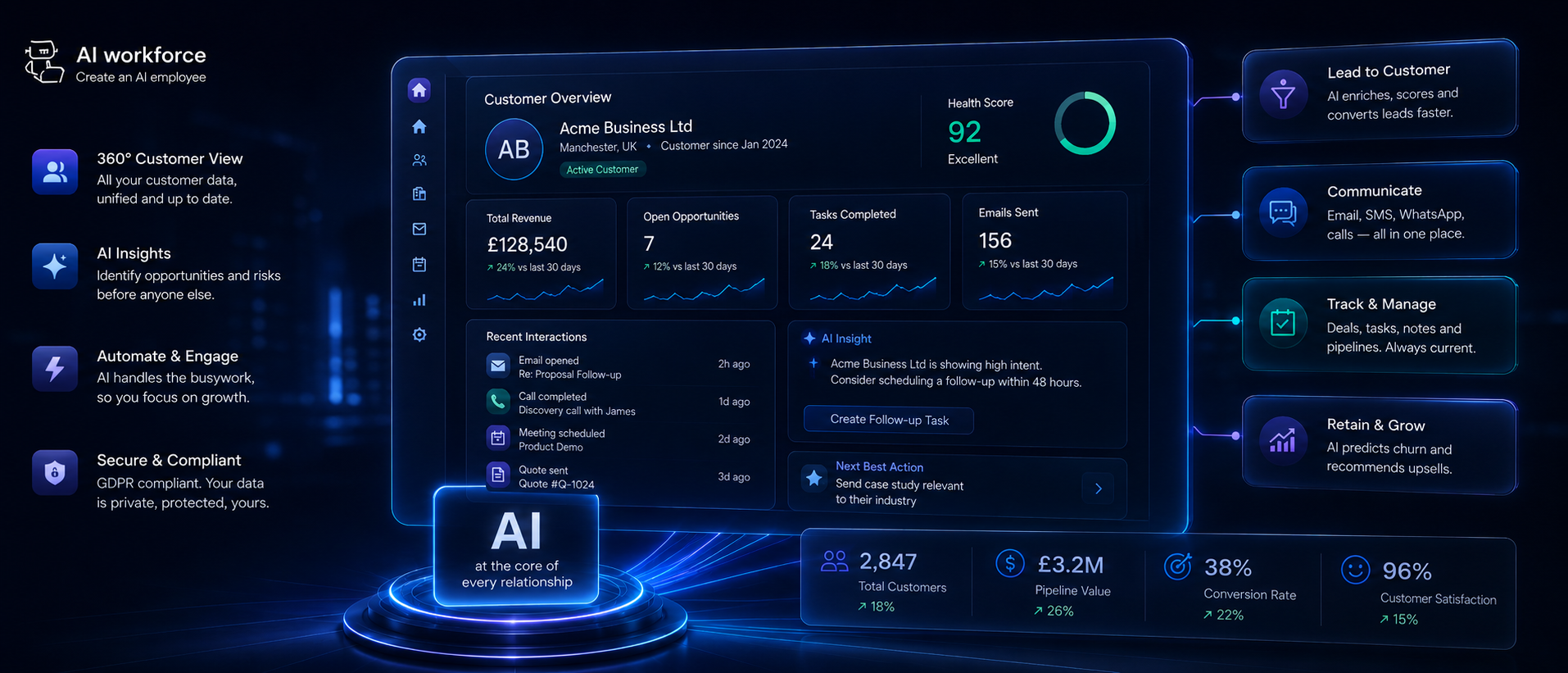
An AI CRM is a customer relationship management system with a layer of intelligence built on top of the same records a traditional CRM already stores: contacts, companies, deals, tickets and activity history. A CRM on its own stores information. An AI CRM reads that information, works out what needs attention, and in defined cases updates the record itself, instead of leaving every field dependent on a person remembering to check it.
Contact storage, activity logging and pipeline views are table stakes at this point. What actually separates a modern platform from a basic contact list is what happens after the data lands: whether the system can summarise a call, score a lead against real signals, flag a deal that has gone quiet, or draft a follow-up a rep can send with a light edit, rather than leaving all of that to whoever happens to notice first.
This matters more every year because customer relationships now generate more activity than any person can review by hand: emails, calls, meetings, support tickets and web behaviour, often across several disconnected tools. An AI CRM's job is to turn that volume into a short, prioritised list a person can actually act on, and to handle the mechanical parts of keeping records current without waiting for someone to have a spare ten minutes.
Traditional CRM vs CRM Automation vs AI CRM vs Agentic CRM
These four terms describe genuinely different levels of capability, and treating them as interchangeable is a common source of disappointment when a business buys "AI CRM" expecting one thing and receives another.
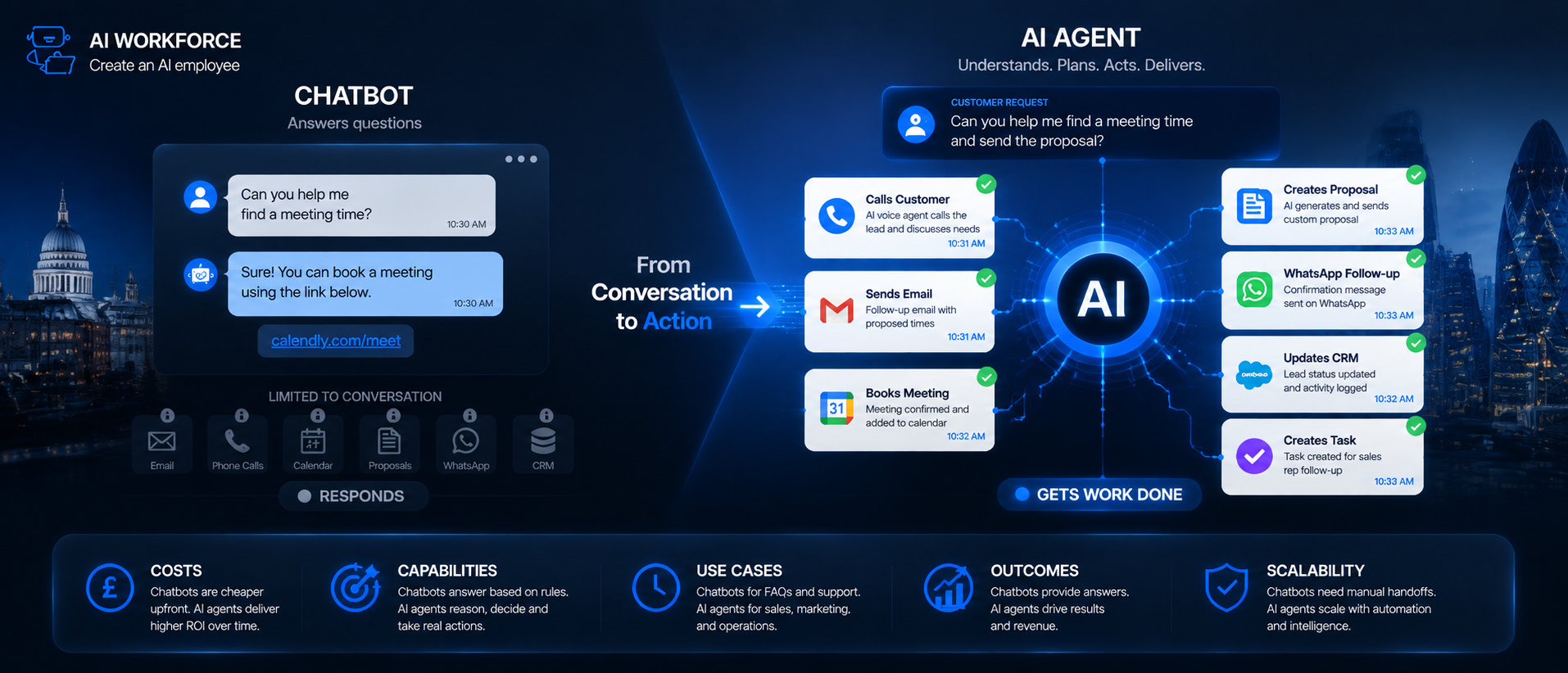
Traditional CRM: stores customer and deal state. Contacts, companies, deals and tickets live here, and a person has to update every field manually
Rules-based CRM automation: performs deterministic actions when predefined events occur, such as sending a reminder five days after no activity or assigning a new lead to the next rep in a rotation. No interpretation is involved; the trigger and the action are both fixed in advance
AI-assisted CRM: summarises, scores, drafts and recommends. It reads unstructured content, such as an email or call transcript, and turns it into something structured and useful, but a person still decides what happens next
Agentic CRM: interprets context and can take bounded actions across CRM records and connected systems, such as updating a deal stage, creating a task, or triggering a workflow in another tool, within limits a business has explicitly defined
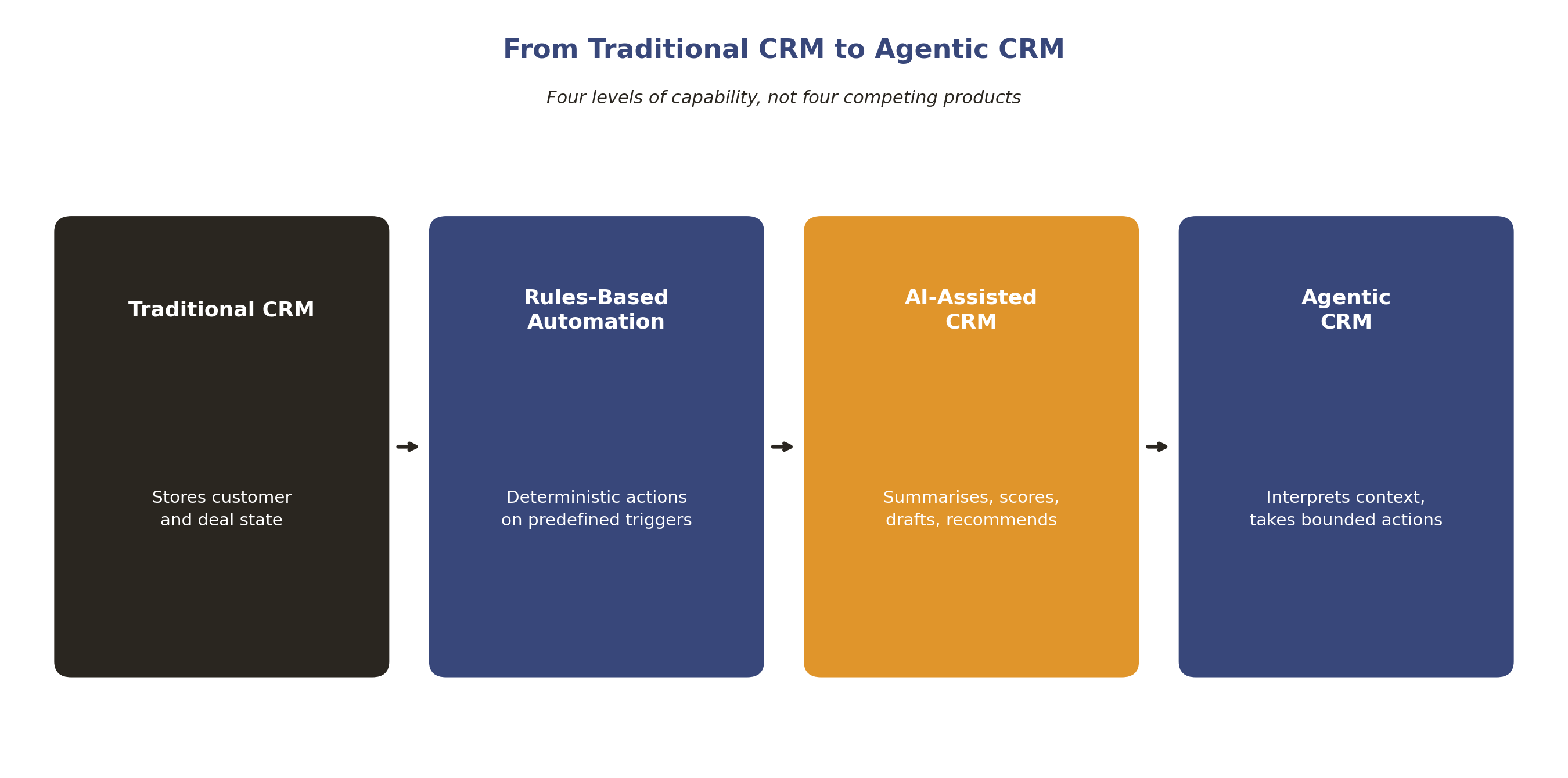
Illustrative spectrum. Most platforms marketed as AI CRM sit somewhere between AI-assisted and agentic, not cleanly at one end.
Most platforms marketed as "AI CRM" in 2026 sit somewhere between AI-assisted and agentic, with the balance shifting further toward agentic capability as vendors add more autonomous features. Knowing which level a specific tool actually operates at, rather than assuming from the marketing page, is the first useful question to ask before comparing anything else.
The AI Workforce CRM Intelligence Model
A CRM's AI layer is easier to reason about and to govern once it is broken into distinct stages rather than treated as one undifferentiated "AI" feature. At AI Workforce, we use a CRM Intelligence Model built on five layers, each with a different job and a different level of risk.
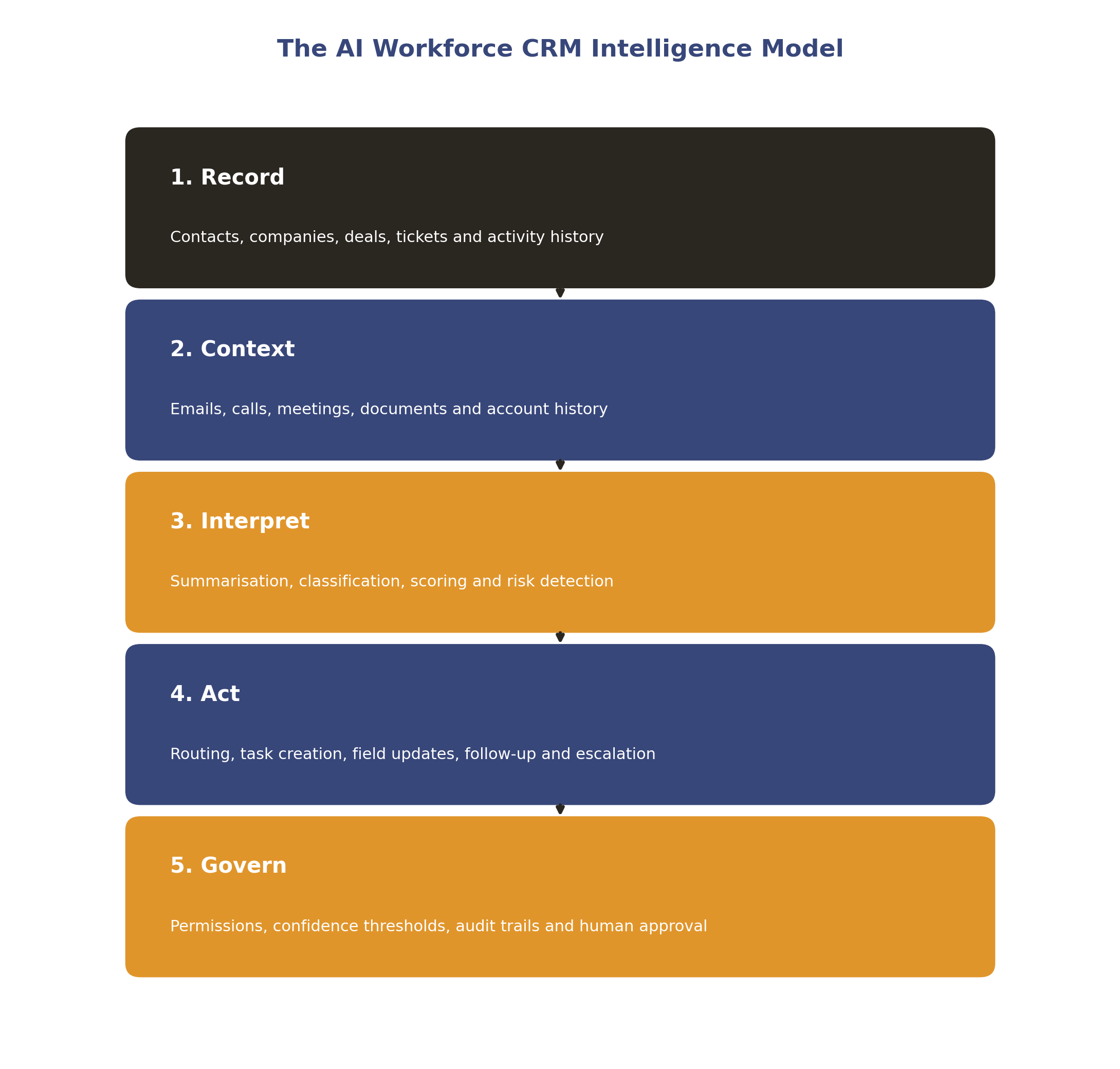
Illustrative model. The specific rules behind Act and Govern should reflect your own risk tolerance and sales or service process, not a generic template.
Record: the underlying contacts, companies, deals, tickets and activity history a traditional CRM already stores
Context: the emails, calls, meetings, documents and account history that give a record meaning beyond its raw fields
Interpret: summarisation, classification, scoring and risk detection, turning context into something structured a person or a workflow can use
Act: routing, task creation, field updates, follow-up drafting and escalation, the layer where the system actually does something
Govern: permissions, confidence thresholds, audit trails and human approval, the layer that decides how much autonomy the Act layer is actually given
Most of the disappointment businesses report with AI CRM tools traces back to a missing or weak Govern layer, not a weak Interpret layer. Modern language models are generally competent at summarising a call or drafting a follow-up. The harder, less solved problem is deciding which of those outputs should write directly into the CRM unattended, and which should sit in front of a person first. The next two sections work through that distinction directly.
What Can AI Safely Automate in a CRM?
Some CRM updates are safe to apply without a person reviewing each one, because the evidence is unambiguous and the event is verifiable rather than inferred from tone or a plausible-sounding pattern.
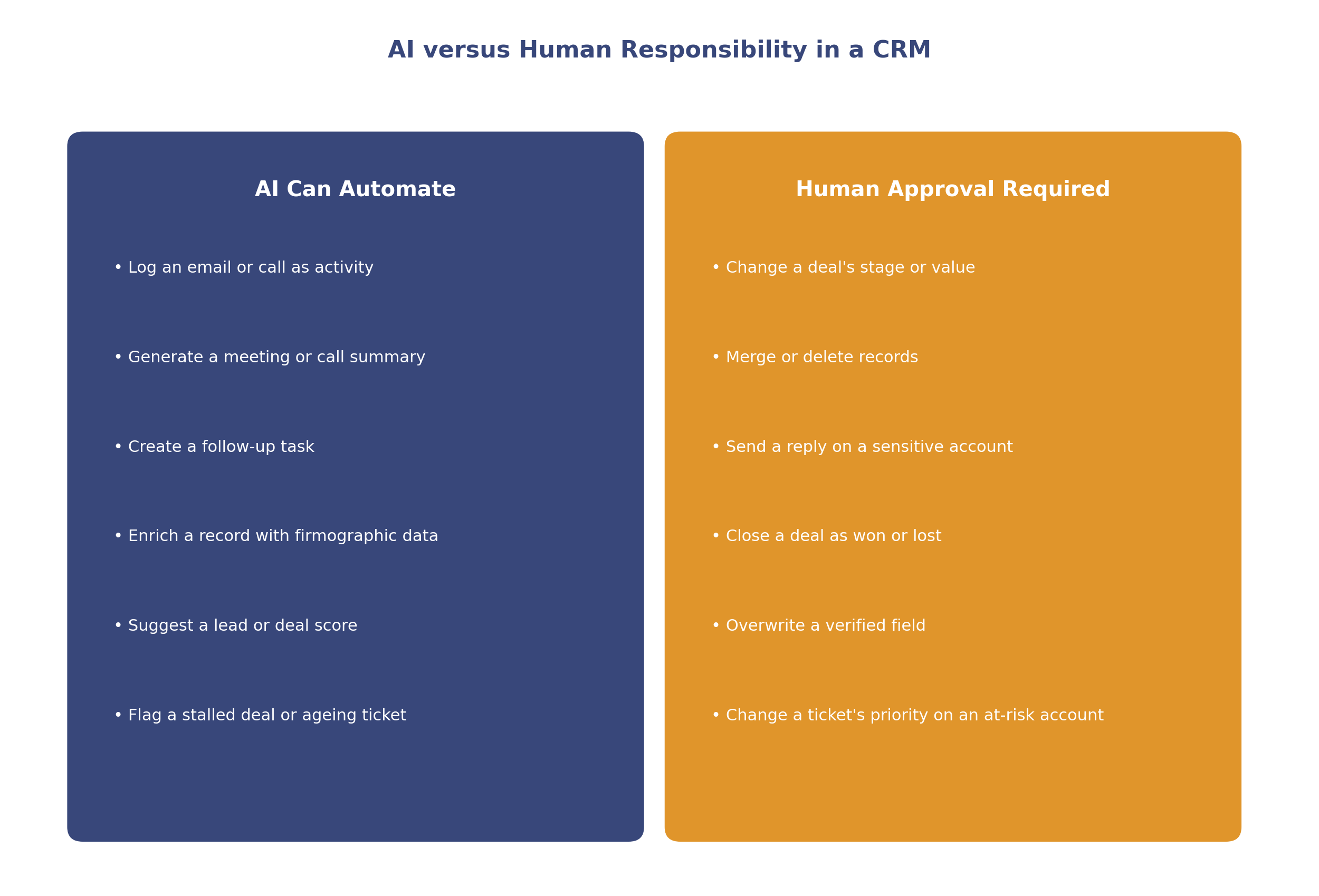
Illustrative split. Your own risk tolerance and process should determine exactly where a given action lands.
Logging an email or call as activity against the correct record
Generating a meeting or call summary from a transcript
Creating a follow-up task after a defined trigger, such as a call ending with no next step logged
Enriching a new record with firmographic data, with the source of that data recorded alongside it
Suggesting a lead or deal score as a recommendation a person can see and act on
Flagging a stalled deal, an ageing ticket or a record with no recent activity for review
These are the actions where getting it wrong costs a little time to correct, not a wrong number in a forecast or a mishandled customer relationship. The next section covers the actions that sit on the other side of that line.
What Should Require Human Approval?
A separate set of actions should never be applied by AI without a person confirming them first, because a mistake here is expensive in a way a missed reminder is not.
Changing a deal's stage based on inferred intent rather than confirmed evidence
Changing a deal's commercial value
Merging or deleting records, even where the match looks obvious
Sending a reply to a customer on a sensitive, escalated or high-value account
Closing a deal as won or lost without a hard-rule condition, such as a signed contract or a confirmed loss reason, behind it
Overwriting a person's manually verified field with lower-quality third-party enrichment
Changing a support ticket's priority or resolution status on an account already flagged as at risk
Rather than a single automation switch, the safest way to bound these decisions is by the model's own confidence in a specific update: high confidence and verifiable evidence can move to automatic, medium confidence should be recommended for a person to confirm, and low or conflicting evidence should hold for review rather than guess in either direction. This is the same confidence-based governance approach we use across AI Workforce's sales and service content, applied here to CRM writes specifically.
AI CRM for Sales, Marketing and Customer Service
An AI CRM's value looks different depending on which part of the business is using it, even though the underlying record often sits in the same system.
In sales, the clearest wins are the most repetitive ones: lead and deal scoring, stalled-deal detection, and call or email summarisation, all handled consistently and at any hour, without waiting for a manager's reminder. A rep working from a scored, prioritised list spends the day differently to one working from an unsorted queue.
In marketing, the same underlying record supports segmentation, campaign attribution and lead handoff quality. A CRM with a strong Interpret layer can flag which marketing-sourced leads are actually converting, rather than leaving that judgement to a monthly report built after the fact.
In customer service, a system that remembers every past interaction can route a request to the right person immediately, rather than making a customer repeat themselves. Sentiment signals in a support ticket can catch a frustrated tone before it turns into a cancellation, and a consistent record across support, sales and marketing means every team is working from the same enriched account view rather than three partial ones.
The common thread across all three functions is the same: AI is most useful where it turns raw activity into a short, prioritised, explainable list, not where it is left to make consequential decisions unsupervised.
AI CRM Examples: Salesforce, HubSpot, Zoho and Others
Vendor capability in this space changes often, so treat any comparison, including this one, as a snapshot rather than a permanent ranking. It is worth grouping vendors by the job they are actually built for, since a straight sales-versus-service comparison tends to misrepresent what each platform is strongest at.
Sales CRM:
Salesforce combines predictive AI, conversation intelligence and Agentforce capabilities across its Sales Cloud editions, with predictive scoring available from its Unlimited edition and fuller autonomous Agentforce capability bundled into its premium Agentforce 1 Sales tier, so the depth of AI functionality varies considerably by plan rather than being uniform across the product
HubSpot ships its Breeze Assistant on every tier, including the free CRM, alongside more than 100 embedded AI features spread across its Marketing, Sales and Service hubs, while autonomous Breeze Agents and deeper customisation are reserved for Professional and Enterprise plans
Zoho CRM's AI layer, Zia, handles anomaly detection, next-best-action suggestions and best-time-to-contact recommendations, generally available from the Professional plan upward, with more advanced capability unlocked at Enterprise and Ultimate tiers
SMB-focused CRM: HubSpot and Zoho both compete strongly here, alongside platforms such as Pipedrive, which tends to prioritise simplicity and pipeline visibility over the breadth of AI feature coverage found in larger platforms.
Customer-service and CX layer:
Freshworks' Freddy AI is built tightly into the support interface, automating ticket routing, prioritisation and sentiment scoring as part of the core workflow rather than as an add-on
Zendesk's Intelligent Triage classifies every ticket by intent, entity, sentiment and language simultaneously, feeding both routing and reporting
None of this is an endorsement of a single platform. Vendor choice usually comes down to which system already matches your existing tech stack, since migrating a CRM a team already knows has its own real cost, separate from whichever tool has the longer AI feature list.
CRM-Native AI vs Specialist AI Tools
Businesses evaluating this space usually end up choosing between the AI built directly into their CRM and specialist AI tools that connect alongside it, and for most teams the right answer is both, used for different jobs.
CRM-native AI tends to have an advantage on full context, since it already has the complete record without a data sync; fewer sync problems, because there is no second system that can drift out of date; easier adoption, since a rep is not learning a new interface; and stronger permissions alignment, inheriting the CRM's existing access controls.
Specialist AI tools tend to have an advantage in deeper capability in a narrow task, such as conversation intelligence pulled directly from calls, more sophisticated enrichment sourcing, or a scoring model trained across a wider dataset than one business's own CRM history can provide.
Neither category is universally better, and framing native AI as automatically superior overstates the case; a specialist tool can genuinely outperform native functionality on the specific task it was built for. The strongest setups typically use CRM-native automation for record integrity, the things that must never drift out of sync with reality, while specialist tools supply extra intelligence layered on top where it is genuinely needed.
Where AI CRM Automation Goes Wrong
A fair account of this technology has to include where it fails, not just where it helps:
Writing a confident but factually wrong update into a record, because the underlying signal was weaker than the output sounded
Treating engagement, such as an email open, as proof of a genuine change in deal status
Overwriting a person's manually verified field with lower-quality third-party enrichment
Merging or deleting records that were only a partial match
Closing a deal or resolving a ticket automatically with no hard-rule condition behind the change
Letting a stale enrichment field quietly become the basis for a scoring decision
Granting an AI feature broader read or write permissions than the specific workflow actually needs
A forecast or health score built on model confidence alone, with no observed fact behind it
None of this makes the category unsuitable. It means the Govern layer of the CRM Intelligence Model, and a habit of checking what the system actually changed rather than assuming it worked, matter more than how capable the AI looks in a demo.
UK GDPR, Permissions and Data Governance
An AI CRM is unusually sensitive from a data protection standpoint, because it can potentially both read and write into the system of record, and because a CRM commonly holds named contacts, call transcripts, email history, behavioural data, inferred scores and personal notes together in one place. This section is general information rather than legal advice.
UK GDPR applies to that processing regardless of whether a person or an AI system is the one updating the record. The most common lawful basis for holding and processing B2B CRM data is legitimate interests, supported by a documented purpose, necessity and balancing assessment, rather than assumed by default. Data minimisation still applies: an AI layer should read and write only what a specific workflow genuinely needs, not everything a connector happens to expose.
Automated decisions matter specifically here. Where a CRM's AI layer makes a significant decision about an individual solely through automated processing, such as an automated scoring outcome that meaningfully affects how they are treated, additional safeguards can apply under UK data protection law, including transparency, the ability to make representations and access to human intervention. AI Workforce's recommended operating model is more cautious than the legal minimum: consequential CRM decisions, particularly anything affecting how a named individual is treated, should stay reviewable by a person.
Permissions deserve as much attention as the AI features themselves. Role-based access, read versus write access, field-level permissions, audit logs, data provenance, the ability to reverse or roll back an automated change, and clarity on whether a vendor trains its own models on your customer data are all governance questions worth answering before an AI layer is given write access to a live CRM. Where third-party connectors are involved, confirm what each one can actually read and write, not just what the workflow was designed to use. Our guide to AI and GDPR compliance for UK businesses covers the underlying framework in more depth.
What Does an AI CRM Cost?
Cost depends on how much of the CRM you are automating and whether you are extending an existing platform's native AI or adding a specialist layer on top. Based on typical UK small business automation projects:
Simple automation (roughly £500 to £2,000): for example, automated activity logging and stalled-record flagging connected to an existing CRM
Mid-range build (roughly £3,000 to £10,000): for example, scoring, summarisation and recommend-only routing built around defined confidence thresholds
Custom AI (£10,000 and up): for example, a bespoke scoring and forecasting model trained on your own historical CRM data, integrated with confidence-based automatic writes
Ongoing monthly cost (roughly £200 to £800): monitoring, maintenance and periodic retuning as your data and processes change
Native platform AI: typically bundled into higher CRM tiers or sold as a per-seat add-on, commonly £20 to £100 per user per month on top of the base CRM subscription, varying considerably by vendor and edition
Within any of these tiers, the total figure is really made up of five components worth pricing out individually: implementation, the initial build and CRM integration; software, platform or per-seat licensing; AI credits, usage-based cost for the generative and scoring layer; data costs, licensed enrichment billed separately from the platform; and maintenance, ongoing monitoring and retuning as your CRM structure changes. A more detailed breakdown of UK automation cost drivers generally is covered in our guide to AI automation pricing.
How Do You Evaluate an AI CRM Vendor?
Before committing to a platform, put these questions to the vendor directly:
Which CRM updates does the AI layer apply automatically, and which does it only recommend?
Can automation authority be set separately by confidence tier, rather than as one blanket setting?
What permissions does the AI feature actually require, and can read and write access be scoped separately?
Can I see why the AI made a specific recommendation or update, not just that it happened?
Can every automated change be traced back to what triggered it, and reversed if it was wrong?
Does the platform separate genuine evidence, such as a confirmed calendar event, from an inferred pattern?
Is customer data used to train the vendor's own wider models, and can that be disabled?
How does the platform handle a low-confidence or conflicting-signal update by default?
A vendor that cannot answer these clearly, or treats the questions as unusual, is a signal to slow down.
A Four-Week AI CRM Pilot
Rolling AI capability into a live CRM against a constrained slice of records is safer than switching on full automation across the whole system from day one.
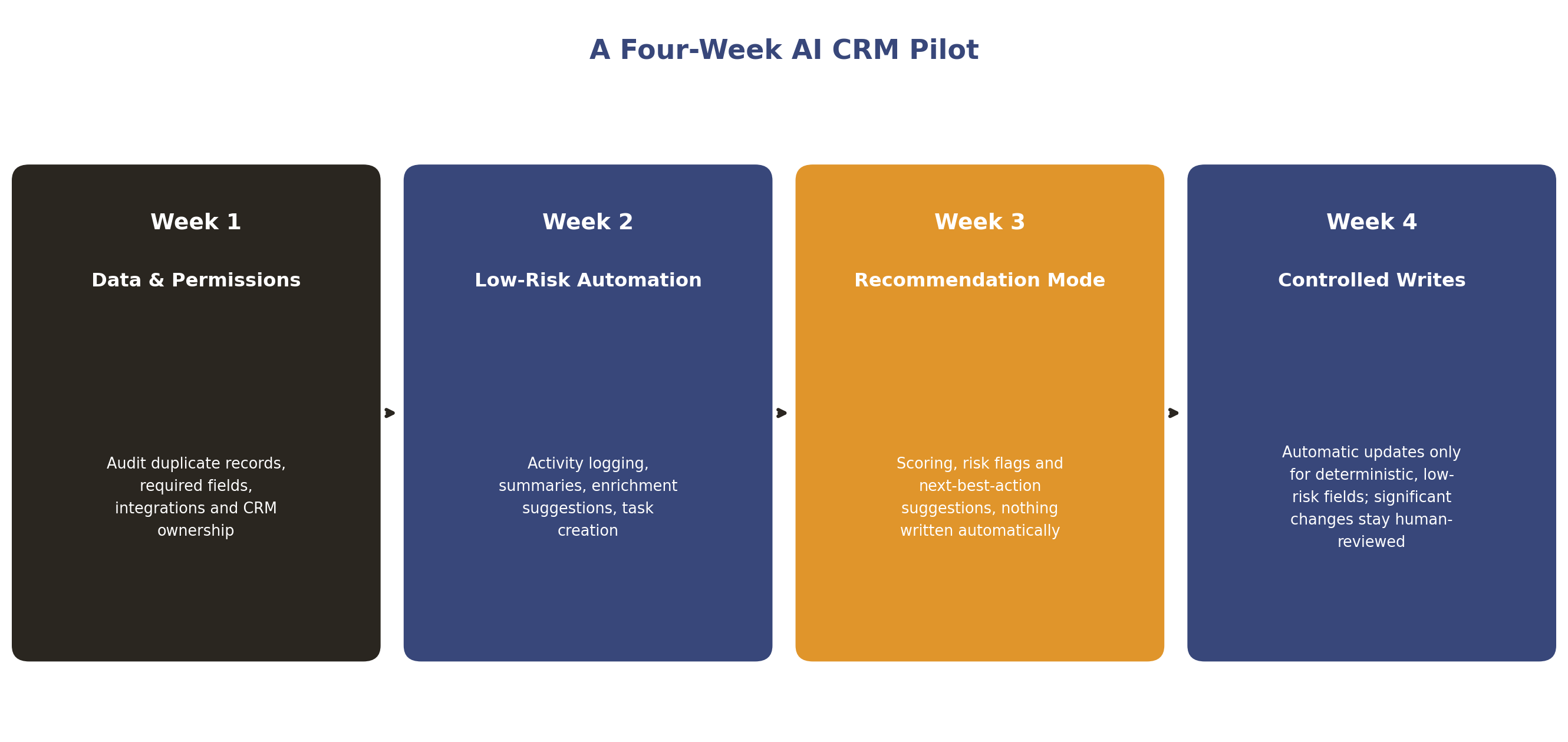
Illustrative roadmap. Expand to additional record types or automatic writes only once the earlier stages have proven themselves.
Week one, data and permissions: audit duplicate records, required fields, connected integrations, access permissions and CRM ownership before adding any AI capability on top.
Week two, low-risk automation: turn on activity logging, call and meeting summaries, enrichment suggestions and task creation, all of it visible to a person rather than silent.
Week three, recommendation mode: enable scoring, risk flags and next-best-action suggestions on live records, but do not let the system write any of them automatically yet.
Week four, controlled writes: turn on automatic updates only for deterministic, low-risk fields, while every commercially or personally significant change stays under human review.
How Do You Measure AI CRM ROI?
Number of AI actions taken is not a sufficient measure, since a system can look busy while quietly degrading data quality. Track a broader set of indicators instead:
CRM field completeness, the proportion of required fields that are actually populated
Duplicate-record rate across contacts and accounts
Time spent on CRM administration per rep or per agent, measured against a real baseline
Percentage of open opportunities or tickets with a valid, recorded next action
Lead-routing time, from a record landing in the CRM to reaching the right owner
Stage or status accuracy, how often a record's recorded state actually matches reality when checked
Forecast error, comparing predicted to actual outcomes over a full quarter
Human override rate, how often a person reverses or edits an AI-suggested update
Response time and, where service is included, resolution time
The single most useful metric for judging whether the system can actually be trusted is the AI correction rate: the percentage of AI-generated CRM updates that a person subsequently changes or reverses. A low, stable correction rate is a stronger signal of a healthy rollout than raw automation volume, though it is worth reading alongside override rate rather than alone, since a low correction rate can also mean people are not checking closely enough to catch a mistake.
Which Type of AI CRM Fits Your Business?
A small team with straightforward pipeline needs is usually better served by a CRM's native AI features than by adding a specialist layer on day one; HubSpot's free-tier Breeze Assistant or Zoho's Professional-tier Zia are reasonable starting points precisely because the AI ships inside the platform the team already uses.
A growing sales or service team with genuine volume, and a specific pain point native AI does not solve well, such as deep conversation intelligence or forecasting built on a wider dataset, is where a specialist tool layered on top of CRM-native automation tends to earn its cost.
An enterprise team with multiple departments, several connected systems and real compliance exposure needs to treat this as a governance decision as much as a feature decision: confidence-based routing, audit logging and clearly scoped permissions matter more at that scale than which vendor has the longest AI feature list.
AI Workforce Insight: the AI CRM rollouts that hold up over time are the ones where every automatic write traces back to a defined piece of evidence, not a plausible pattern the model inferred. That single design decision, made early through the Govern layer of the CRM Intelligence Model, is what keeps a CRM trustworthy instead of confidently wrong.
Related Guides
AI Sales Pipeline Management: A Practical Guide for B2B Teams
AI Appointment Setter: A Practical Guide to Automated Booking
Frequently Asked Questions
What is an AI CRM?
An AI CRM is a customer relationship management system with an intelligence layer that reads records, emails, calls and activity, then summarises, scores, drafts and, within defined limits, updates the CRM itself, instead of leaving every field dependent on manual entry.
What is the difference between a traditional CRM and an AI CRM?
A traditional CRM stores customer and deal state and depends on a person to keep it updated. An AI CRM adds a layer that reads that data, interprets it, and can update records itself within rules a business has defined, moving from passive storage to active assistance.
Can AI update CRM records automatically?
Yes, for actions where the evidence is unambiguous, such as logging an email or confirming a calendar event. For commercially or personally significant changes, such as closing a deal or merging records, the system should recommend the change and a person should confirm it.
What is an AI CRM agent?
An AI CRM agent is the agentic end of the spectrum: a system that can interpret context and take bounded actions across CRM records and connected systems, such as updating a stage or triggering a workflow, within limits a business has explicitly defined, rather than only summarising or recommending.
Is AI CRM safe for customer data?
It can be, provided permissions are scoped to what each workflow genuinely needs, changes are logged and reversible, and consequential decisions stay reviewable by a person. UK GDPR applies to CRM data regardless of whether a person or an AI system processes it.
What is the best AI CRM for a small business?
There is no single best option; it depends on existing tooling and budget. HubSpot's free-tier Breeze Assistant and Zoho's Professional-tier Zia are reasonable starting points for a small team, since both ship AI inside a platform many small businesses already use.
Should you use CRM-native AI or a separate AI tool?
Most teams benefit from both. CRM-native AI tends to offer fuller context and fewer sync problems, while a specialist tool can outperform native functionality on a narrow task such as deep conversation intelligence or forecasting trained on a wider dataset.
How much does an AI CRM cost?
A defined workflow commonly costs £3,000 to £10,000 to build, with £200 to £800 a month in ongoing costs. Native platform AI is typically bundled into higher CRM tiers or sold as a per-seat add-on, commonly £20 to £100 per user per month.
Can AI replace CRM data entry?
Largely, yes, for the mechanical parts: logging activity, drafting summaries and enriching records. It should not replace the judgement calls, such as confirming a deal is genuinely closed or that two records are true duplicates, which should stay with a person.
Key Takeaways
An AI CRM adds a layer that reads, interprets, and, within limits, acts on records a traditional CRM already stores, rather than replacing the underlying system
Traditional CRM, rules-based automation, AI-assisted CRM and agentic CRM describe genuinely different capability levels; know which one a specific tool actually is
The AI Workforce CRM Intelligence Model, Record, Context, Interpret, Act and Govern, separates the layer that generates output from the layer that decides how much autonomy it gets
A defined set of actions, closing a deal, changing its value, merging records, should always require human approval regardless of model confidence
Vendor AI capability varies significantly by plan and edition, not just by product, so compare tiers directly rather than a vendor's headline feature list
CRM-native AI and specialist tools solve different problems, and the strongest setups usually combine both rather than treating one as universally superior
An AI CRM is unusually sensitive from a data protection standpoint because it can both read and write into the system of record; permissions deserve as much attention as the AI features themselves
Track AI correction rate alongside field completeness and forecast error, not just automation volume, to judge whether a rollout can actually be trusted
Start narrow: audit data and permissions, enable low-risk automation, run in recommendation mode, then automate only deterministic writes first
This article is general information rather than legal advice. Take independent advice on data protection obligations specific to your own CRM setup and customer base.
Ready to Make Your CRM Work for You?
We'll help you map your CRM data against the Intelligence Model, decide what AI should update automatically versus recommend, and build a piloted rollout that keeps your records trustworthy from week one.
About the Author
Rodi Taze is Co-Founder of AI Workforce. He works with UK businesses to design CRM automation that stays governed as autonomy increases, with a particular focus on making confidence-based write permissions practical rather than theoretical.
This guide was reviewed by Clara Miller, Content Marketing Specialist at AI Workforce, for clarity, structure and alignment with how UK sales and service teams actually evaluate and adopt AI CRM tools.
Reviewed: August 2026