Best AI Executive Assistant Tools: We Tested the Best
Posted On: July 30, 2026
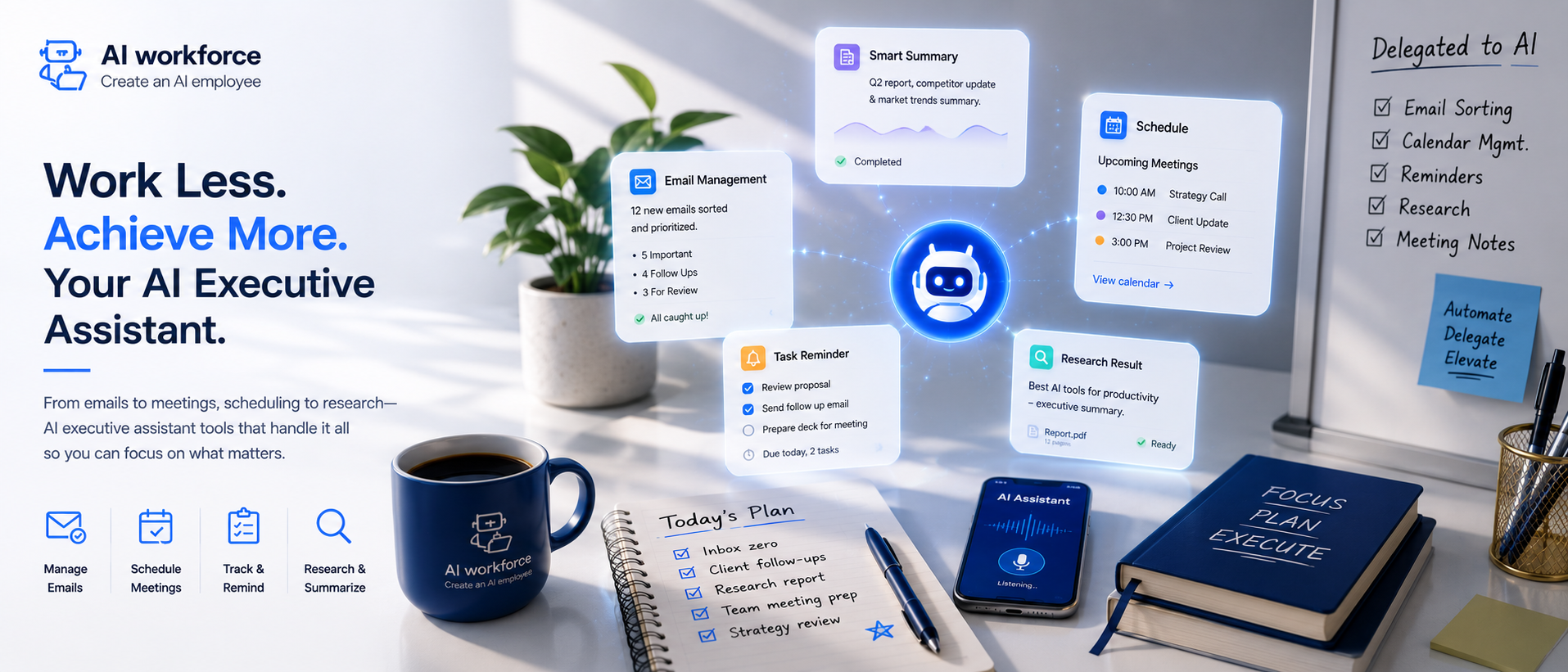
An AI executive assistant now handles the scheduling, email, and day-to-day work that used to eat up hours of an executive's week. This guide covers what these tools actually do well, how they compare to a broader AI personal assistant, and how to pick one that fits the way you actually work.
What Is an AI Executive Assistant and How Does It Work?
An AI executive assistant is software that handles scheduling, email, and the small tasks the way a real assistant would, without needing a desk, a salary, or a lunch break, all while protecting your schedule from the small decisions that quietly eat a day. Rather than working like a general assistant that answers any question, it's built specifically around the repetitive parts of running someone else's calendar and inbox.
AI handles the small decisions that used to interrupt your day dozens of times: which meeting gets priority, when to push something back a day, which email actually needs a reply today. Autonomous AI carries out those small AI actions on your behalf, and proactive AI flags anything that actually needs your judgement instead of waiting to be asked.
This is different from a general-purpose digital assistant bolted onto a phone: business AI built for this kind of role is trained specifically on calendars, inboxes, and the kind of decisions an executive makes fifty times a day, not general trivia.
How Do You Pick the AI Executive Assistant That Fits?
Choose the right AI executive assistant for the way you actually work, not the tool with the longest feature list: some people want an AI that drafts every email, others just want it to protect their calendar and nothing else.
AI tool selection comes down to three things: how well it integrates with your existing calendar and email, how much it costs, and whether the automation is trustworthy enough to act without asking first every time. Integration with your existing stack matters more than any single flashy feature, and a tool built specifically for this kind of role usually beats a generic chatbot with a calendar bolted on.
Workflow fit matters just as much: a tool built around a rigid workflow forces you to change how you work, while a good one adapts to your existing workflow instead. AI is still evolving fast in this category, so pick a tool with room to grow rather than one that's already maxed out. Most of the tools on this list handle the basics well; the differences show up in the details.
What Are the Best AI Executive Assistants in 2026?
These tools range from simple scheduling bots to full AI employees that manage your entire inbox, draft replies, and rebook meetings without being asked. The right choice for you depends heavily on whether you need calendar help, email help, or both.
These platforms increasingly compete less on raw AI chat quality and more on how deeply they integrate with the tools you already use daily. Options with a genuine free tier let you test real workflows before paying anything, which matters more than a flashy demo.
Top AI tools in this category typically fall into two camps: calendar-first assistants and inbox-first assistants, and the best AI assistants usually specialise in one before expanding into the other. Each option worth testing shares the same trait: it acts on your behalf without needing constant supervision.
Is There a Good AI Personal Assistant for Solo Founders?
A personal assistant historically meant hiring someone part-time; today, a solo founder can get most of the same value from an AI personal assistant that manages a calendar, drafts replies, and handles the small tasks between meetings. The best AI personal assistants available now handle 80% of what a junior hire would, at a fraction of the cost.
A personal AI assistant differs slightly from an AI virtual assistant in emphasis: one leans toward personal life logistics, the other toward professional and executive tasks, though most modern tools blend both. A virtual assistant used to mean a human working remotely; now it increasingly means software first, human only when truly needed.
An assistant like this earns trust gradually, the same way a new hire does, starting with low-stakes tasks before taking on your calendar entirely.
How Does an AI Assistant Handle Scheduling and Calendar Management?
Calendar management is where most of these tools earn their keep first: schedule a meeting by describing it in plain language, and the tool finds a slot, checks conflicts, and sends the invite without you touching a calendar app. AI calendar tools like this can schedule around time zones automatically, something that used to eat up an embarrassing amount of back-and-forth email.
Need to reschedule? Ask once, and it reschedules everything downstream automatically, updating attendees and adjusting any dependent meetings without you manually chasing each person. AI scheduling like this also learns your preferences over time: when you'd rather not take calls, which days you protect for deep work, and how much buffer time you actually want between meetings.
Tools like Reclaim AI popularised the idea of an AI scheduler that treats your own focus time as seriously as a client meeting, defending blocks on your calendar the same way it would defend a call with your biggest customer. Compare that to Google Assistant, which can schedule a single event well but was never built as a dedicated scheduling tool for a busy executive's full calendar. Either way, the goal is the same: find the best time for everything without you doing the finding, and this kind of AI time defence matters more as your calendar fills up with other people's priorities instead of your own.
Can AI Handle Admin and Project Management Too?
Admin work is the least glamorous part of any executive role, and it's exactly where AI admin earns its value fastest: expense reports, meeting notes, follow-up emails, the stuff that piles up when you're busy doing the actual job and trying to keep your schedule intact. AI email handling means drafts get written before you even open your inbox, often in replies in your voice close enough that only light editing is needed.
Project management gets a boost too: a good AI executive assistant can update a project management tool automatically from meeting notes, turning a rambling conversation into three clear action items without anyone typing them by hand. Management tools that used to need manual updates after every call now update themselves from the transcript, and your schedule updates alongside them automatically.
None of this replaces dedicated work tools built for deep project tracking, but it does mean less manual data entry between them: draft a task, draft a summary, draft a follow-up, all pulled from the same conversation instead of retyped three times.
How Do You Integrate an AI Executive Assistant Into Your Workflow?
Integration is the make-or-break factor for any tool you're evaluating: it needs to connect to your actual calendar, your actual email, and ideally your actual project board, not a stripped-down version of each. The assistant connects once during setup, syncing with your schedule automatically, and then works quietly in the background from then on.
Automate the parts of your workflow that are purely mechanical, sending a follow-up, blocking focus time, updating a status, and keep a human in the loop for anything involving judgement or a relationship with another person. Automation should feel invisible when it's working well: you notice it mainly when something breaks.
Executive workflows differ enough from role to role that a rigid assistant app rarely fits everyone: some options focus narrowly on inbox triage, others try to cover the entire day. Match the tool to your actual executive needs rather than the most feature-rich option on the market.
Does AI Replace a Human Executive Assistant?
Using an AI executive assistant doesn't have to mean replacing a dedicated human assistant entirely; for a lot of growing companies, it means delaying that hire by a year or two, or making one human assistant effective for three executives instead of one. Human assistants become more strategic when the repetitive scheduling and paperwork gets handled elsewhere first.
The assistant learns your preferences the longer you use it, and the assistant provides fewer wrong guesses over time as a result, the same way a new human hire gets better after their first few weeks. AI learns from corrections quickly, which is why the first two weeks with any of these tools matter more than people expect.
AI agents like this work best as a force multiplier for a human assistant, not a wholesale replacement, freeing a person to focus on the judgement calls a tool still can't make.
How Much Time Can You Reclaim With AI Automation?
Reclaim time by removing the small decisions that eat a surprising share of an executive's week: which meeting to prioritise, when to answer an email, how to fit in actual focus time between back-to-back calls. Productivity gains from this are rarely dramatic in any single week, but they compound fast over a quarter, and so does your schedule once the busywork stops crowding it out.
Some tools double as an AI habit tracker too, nudging you to protect recurring focus blocks the same way you'd protect a repeating client call, which helps reclaim time that otherwise quietly disappears into whatever's most urgent that day.
Frequently Asked Questions
Is this actually safe for a real calendar? Yes, most tools ask for calendar and email permissions the same way any scheduling app would, and you control what it's allowed to send without approval, and you can revoke schedule access at any time.
Does it work for a whole team, not just one executive? Increasingly yes. Use AI across a leadership team and each person keeps their own preferences while sharing one connected calendar view.
What if I don't trust it yet? Start narrow: let an assistant AI handle scheduling only for the first month, then expand into email and other tasks once you trust the judgement calls it's making.
AI assistants help most when they handle the boring 80% so a person can focus on the interesting 20%: AI takes the first pass on routine scheduling and replies, and a person makes the calls that actually need real judgement.
Key Takeaways
An AI executive assistant handles scheduling, email, and the busywork, not judgement calls
Integration with your existing calendar and inbox matters more than feature count
A genuine free tier is worth testing before committing to any single tool
Scheduling and rescheduling are the clearest early wins
Automation should feel invisible; you notice it mainly when something breaks
It rarely replaces a human assistant outright, but it changes what that role focuses on
Reclaimed time compounds fastest once the small daily decisions get handled elsewhere
Ready to Reclaim Your Schedule?
If you're still juggling your own calendar, inbox, and daily tasks by hand, it's worth seeing how much of that can be handled without losing control of the details that matter. Get in touch, and we'll help you find the right starting point.